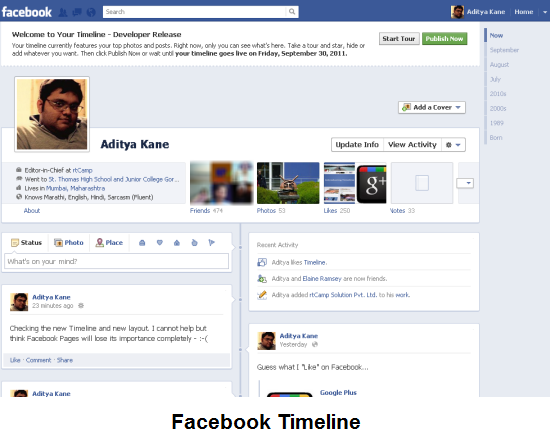
In mid-September, Facebook announced a radical change to its layout. The Timeline feature has made many Facebook users, register as developers. This is because of a trick that allows developers to get Timeline feature on their Facebook profile. So like millions of others, I ended up registering myself as a developer and activating Timeline on my profile. The profile looked a bit like the screenshot below. 🙂

Facebook has delayed rolling out Timeline for all users possibly fearing a backlash.
In case you are feeling stuck on Timelines; you might want to delete the dummy app you created to simply revert back to the old layout or opt-out of Timeline.
Opt-Out of Facebook Timeline
- Firstly, this works for users who registered as a developer to get the new timeline feature. Visit the developer page on Facebook (developers.facebook.com).
- Now look up the App settings which was created to register as a developer for getting Timeline on your profile.
- At the App settings on the left hand corner you can see a link to delete the app (see image).

- Now look up your profile on Facebook and you are back to the old layout. 🙂
Why Facebook Timelines could never be released?
Taking a straw poll of my friends, I found that most people did not find Timeline adding in a big way to their Facebook usage. Some simply found the change of design too radical. Facebook in the past has simply not cared about feedback from users; but with Google+ around, they will be forced to not alienate their users to the extent they might move away from Facebook.
My intuition is that Facebook might release ‘timeline’ with a layout which is a lot similar to the linear way people look at their profile or they might allow users to opt-in and opt-out for them to get used to the new profile layouts.
Do you like Timelines on Facebook? Do drop in your comments.
10 Comments
Thanks for the share Aditya, Useful tip obviously i like the old layout too.. That only like professional profile 🙂
You are welcome. Yes I also personally like the old layout more than the Timelines one.
I did this, and it worked, and then timeline came back to my profile, and when I go to do this again, the app is still deleted.
Am I screwed or is there something else I can do?
@Heather: Facebook is now rolling out timelines across all users so that is why Timeline is back on your account. To bad, I have not yet found a way around it. 🙁
DO NOT WANT IT
DO NOT WANT TO GET TIMELINE
I do not WANT timeline on my computer, under any circumstances. There is enough people meddling into our affairs without permission. I may have to deactivate my facebook and for me that won’t be a problem. I hope that will eliminate the problem
i will simply deactivate my facebook account if the people in charge of FB will not listen to those of us who do not want timeline and who won’t give us the option of sticking with the old layout. I dislike how there is no discussion board, or place where you can send suggestions to, if you want to talk about the direction FB is going. They’ll have lost me if they implement timeline. Enough is enough.
I think that it sucks. I am a web developer and don’t need to use FB for development. To be honest with you, I never really liked it to start with, but now they are just doing stuff that is retarded. They are trying to find anyway that they can to make a buck. I originally signed up for FB to get away from this very same thing on MySpace years ago. Now they are letting people change things that they have no business changing. Next they will let you add music and other garbage to your page.
They are doing way too much. I sent messages to FB devs and yet get no responses back. Time to push on over to G+ like I planned on doing years ago. Problem is that ppl are in love with FB and the whole social media time waste. Honestly Twitter seems like a better option. I dont need to know everything about everyone.
Why should we be forced to have timeline? I absolutely hate the look of the page, the layout of the page, everything about the page, I much prefer the old layout, it should be optional if we want timeline or not we should not be told that we are having it whether we like it or not. The owner of Facebook has made billions by us using facebook, so he should respect that some of us do not like the new timeline page, I absolutely hate it, some of my friends have it they like it but I do not, and when the time comes that we have to use it, I will no longer use Facebook I will delete it. If we all did this then the owner may respect our decision to use timeline or not, and change it so we can revert back to the old layout.
Yours very seriously
Mrs Elaine Whitty
I don’t like having no choice on this timeline crap. I like the old layout and think it is totally inconsiderate to be made to do something that just benefits the developers.