Google Talk is my favorite messenger like many of you and so my friend-list there is quite long. While I love to chat most of the times, I want some sort of privacy while developing codes. I can not sign out completely from messengers, as at times I need to communicate with many geeks for help. So I was one of the person who delighted when Gmail chat got invisible status. But to my surprise Google Talk is not yet updated. 🙁
I personally prefer Google Talk over Gmail Chat so I googled for some solution and found a free software gAlwaysIdle which changes Google Talk context menu shown in screenshot below…
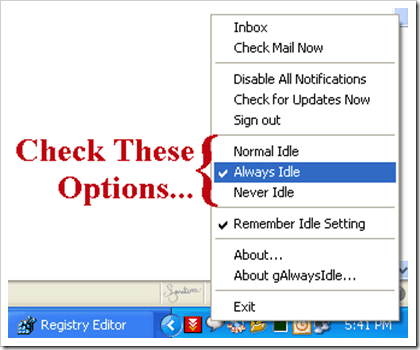
It basically adds a set of status options as you can see in above image!
As highlighted you can choose Always Idle if you are too busy at work. Many users will think that you are not at desk or something similar and thus won’t bother you. 😉
Also there is an exactly opposite option – Never Idle. In case you want to look always online no matter even if you forget to shut down your PC at night!
Update: Many user have reported that gAlwaysIdle original site is down from long time. You can download gAlwaysIdle from our server till then.
97 Comments
good find 🙂 but my friendlist not so long 😛 and i dont…(rather i CANT 🙁 ) develope any codes either :P…STILL… THANKS 🙂
@adi
Thanks but you can still use it while chatting with your girlfriend to avoid disturbance from friends! 😛
Facing some problem….Have to re-login to GTalk whenever i change the setting(Always Idle / Normal Idle). Are you facing the same issue?
@Gautam
I have no such issues.
Are you using Google Talk on slow Internet? Like dial-up or GPRS?
Or just try reinstalling Google Talk as well as gAlwaysIdle!
No, Internet speed is quite good. Its broadband. Ya, will try that. Thanx
Hi, friend
How two down load gtalk with invisible option???
@Sushanta
Check this
Go to the following link and download Google Talk Labs Edition and then install the software gtalk, then you must get the invisible option.Enjoy…
Gtalk Labs doesn’t work for Windows 7. Any solution for this
at which website i can download always idle for gtalk??? help
@Olivia
I guess the original site is down. I will try finding an alternate location and will update about same soon.
Sorry for inconvenience.
@ Rahul
Hi! Do you know an alternative site to download Gtalk? I’m talking about gtalk client not the alwayidle sodtware. It seems impossible to download it form the google home page… Thank you!
@Sal
I just checked Google Talk site and it seems fine.
Anyway here is direct link
🙂 this is very useful!!!!thanks dude
@Deepesh Sodhi –
Your welcome buddy… 🙂
Does anyone have a link to the AlwaysIdle program? Their website is currently down? Anyone know of another place to download?
@Roger & Ram
Added alternative Download link for gAlwaysIdle at the end of above post.
Sorry for delay.
Website is still down
can any one upload to rapidshare and give link
@Rahul..bro i don’t get the link to download the always idle programme?? can u figure it out plz..thnx!
@Mayank
Download Link – http://www.devilsworkshop.org/files/2008/03/galwaysidlesetup.exe
Gud find 😉
very good and useful.. thanks…. 🙂
Very good and useful …. 😀
Well Guess this wont work on vista is it?..wel i downloaded on xp and was working fine..is there any alterntive way to run it on vista.ls suggest.
@biju
I guess its working for Vista OS too!
it doesn’t do anything when i launch the program, where’s it supposed to be?
gtalk idle not working ……… someone can help me !
@John, rakesh:
As you can see in the comments above, its still working for many others and for me too.
Guess, re-installation of the software should help!
When I install this software, it always show the page of “404 Not found”. Please help me. what’s the matter?
I’m using this one from long time an it saves me a lot from embarrassment of not replying..Atleast I don’t have to be in invisible mode…
so nice and need for me. because my friends are call me when i do my work. now, its gone okay. they are seeing i’m idle. 😛
dat’s really nice….i can make a trick to da one who i don’t want to have a conversation… thanx a lot
wel tried reinstalling the same on my lap which runs on vista,but when i try making it idle,the message pops up saying “google encountered internal problems and need to close”..do i have any solution for this problem.
i have d same downloaded at my work place which runs on XP, and that is working fine.Do anybdy find out the solution to this problem.i shall remain.
Thanks alot!! Helpful
thank alot!
thanx so much…:)…it wud do a lot of more gudif u ppl cud make oder related softwares also available on ur forum
I have installed galways idle, but its not working..
i downloaded the setup and installed but its not working..it shows some 404 not found error..can anyone help me out..please..
I have installed the program.. but it just doesnt run..
ny ideas folks?
i downloaded the setup and installed but its not working..it shows some 404 not found error..can anyone help me out..please..
Hey dude, there is a small bug in the program, The no. of times you right click gtalk icon to change setting that many times it adds the menu options Normal idle,Always idle, Never idle etc.
Other wise it works perfect.
Thanx
its good.. but unable to connect via proxy servers.. pls comment
thanx man!!!!!!!!!!!!
i like to chat with this one so many >>>
Is this working in WINDOWS 7?????
I am not able to see the options for idle state after installing the software, I tried re-installing gtalk and galwaysidle softwares too. But dint worked.
Please Help !!
yes its verry nice thanks all
Download gAlwaysIdle Setup
Many user have reported that gAlwaysIdle original site is down from long you can please try this link download and install time http://www.devilsworkshop.org/files/2008/03/galwaysidlesetup.exe
Thanks for the link at last i found it.. galwaysidle is not working
hey dude…
the link you’ve given right the top works brilliantly uptil windows vista.. is there anything i can use to make it work on windows 7?? coz i just tried it and it doesnt work there…
It will work on windows 7.
Procedure:
Download the software and try installing it. A window will pop up saying that this version is not supported. Click ‘ok’. The setup will then exit.
A new window will pop up which will be the OS prompting and telling that the software did not install properly.
Click on the option of ‘Install using recommended settings’
Proceed with the installation.
It’ll work after this.
Enjoy !!
that was awesome and simple, dude. thanks!
dude !! good job.. you got ny more such stuffs like this ?>>
please lemme know…
I downloaded the setup and installed but its not working..it shows some 404 not found error … i have tried all the links provided by you above……please help…………
i think u r trying it on gmail but it works with gtalk
Not working in windows 7 – 64bit.. Any solution?
try changing the compatibility
right click–>properties–>compatibility—>select windows xp
works on 7 x64. install with recommended settings after faiulure. see previous post.
i installed the setup on vista….but still its not wrking
the ‘alwaz idle’ option is visible but no idle status while on gtalk. 🙁
To make it work on windows 7 (32 & 64bit), follow these steps:
Right click on the setup-file and select “Run as Administrator”, then it will install without issues 😉
it doesn’t work on windows 7. can we expect it in near future???
hey dude!
This is not working for windows 7. If there any solution this pls tell me. Thanx a lot..!
Right click the setup-file and then select properties. In the properties, there is a compatibility tab. In that there will be a section called,Run this program in compatibility mode, tick that option and select windows xp.
will any1 tell me wat 2 do to become idle on gtalk…..
I use the never idle feature for my website because I use live chat that connects through Gtalk. Cool plugin!
I downloaded the setup and installed but its not working..it shows some 404 not found error … i have tried all the links provided by you above……please help…………
Thanks alot.
man itzzz simplyyy supeerb!!
thanxx buddy! 😀
gtalk lab edition is not installing,,, after i click on the set up,its telling
“The version of this file not compatible with the version of the windows you are running. check your computer system information to see whether you need an x86(32-bit) or x64(64-bit) version of the program. then contact the software publisher”
my OS is windows server R2 2008…
Thanks for Downloads
hi GEEKs,
I know thats this is working fine …
but its only showing idle for u.. not for your frends..check gmail satus (when ur gtalk is in idle status) is available/busy>> means it for u only there is no change in google server folks..
<>
hai let me dwnload it
its really nice dude..thnks..
100% working
Thanxxx so much….
Does this s/w work with gmail. definitely it is working on gtalk but the light on gmail still shows red. any suggestions for that?
Thanks for the application. This will be the better option.
Workin…. 🙂
Really gud one…
do u have any third party software or tool to detect offline users in gtalk ??? plzzz tell me ……………….
As of now no… I’m working on it…will post soon if done
it doesn’t work with windows 7 🙁 . Do u hv ny updated version which will work on 7 ??
It works on windows 7 32 bit and 64 bit.
Procedure:
Download the software and try installing it.
A window will pop up saying that this version is not supported. Click ‘ok’. The setup will then exit.
A new window will pop up which will be the OS prompting and telling that the software did not install properly.
If the window does not open run the setup once again and repeat.
Click on the option of ‘Install using recommended settings’
Proceed with the installation.
It’ll work after this.
Enjoy !!
Thanks, very useful
Hi,
I tried downloading the s/w with all the links given above. It is giving a 404 error. I am installing it in Windows XP m/c. Could you guys tell me the settings I need to do and help me install it.
Thanks in Advance!
thanks a lot 🙂 it works
can someone plz tell me tht after how long gtok shows you idle on chat ?
Thanks! It’s easy to use.
Thanks . it is useful for all….
Thanks for this solution. It’s usefull for me. But when i run this one on windows 7 my context menu doesn’t changes. After this i uninstall my russian version of gtalk and install english version. After this, i restart gtalk and gidle, and i found this items in menu.
does this work with Google lab edition
i want to download this!!
Hi..yu’ve done a good job..but p.s. help me..its not working..nothing happened after installation 🙁 i very badly need this 🙁
Can this work with gmail. pls let me know.
It will work on windows 7 in 64 Bit or 32 Bit both.
Procedure:
Download the software and try installing it. A window will pop up saying that this version is not supported. Click ‘ok’. The setup will then exit.
A new window will pop up which will be the OS prompting and telling that the software did not install properly.
Click on the option of ‘Install using recommended settings’
Proceed with the installation.
It’ll work after this.
check it – Right click in Notification Try Icon it shows option Always Idle Mode.
Wounder Really It Works…
Enjoy !!
Its work in my Pc Windows 7 in 64 Bit.
No, It won’t work with GMail its only work with Gtalk.
Sorry Guys,
Installed gtalk then installed galwaysidle (using the troubleshoot compatibility option)…no luck.
Then tried going to the Properties and altering the compatibilty to run under Windows XP SP3.
When I go to Task manager processes, it shows me that galwaysidle.exe is running, but gtalk does not show me ANY options. I’m using Windows 7..any solutions would be greatly appreciated