
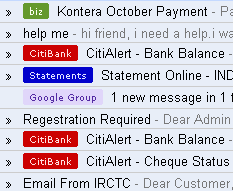
If you used labels too often then you might have noticed slightly different labels box today with some squares next to them! Well its nothing but Gmails colored label feature! So how to use this feature?
It is by default enabled on new Gmail Version which is available only for IE7 and Firefox 2+.
# How to color a label?
Just click on square box next to each label and you will see a small palate of 24-colors as shown in above screenshot! Also there is a link "Remove color" on same palate which comes in handy if you want to remove color at all!
# Editing label name made simpler…
Yep. On same palate there is a link Edit Name, which on clicking prompts new name!
Here this small palate could have been better if there is "Delete Label" link on it!
Anyway hold on there is more….
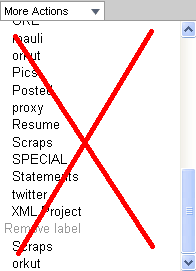 # Removing labels from a mail/conversation…
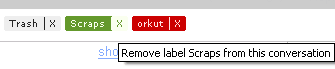
No need to scroll down more actions to remove a label. Instead have a look at subject line and at the end of it you will notice every label with a separate "x" link. Just click on it and that label will be removed from mail/conversation you are reading!
Just have a look at following screenshot…
That’s All! If you find something missing over here, let us know! 🙂
Related Links: Gmails Official Post
3 Comments
Would be much more interesting to label contacts, not only messages. Labelling all family-related, work-related, etc-related contacts would mark all work related mail with one label & color. Contact groups are not that useful – they can’t be used with filtering.
Yep, this is really great suggestion András.
Although gmail enhanced contact manager in their new version, it just navigation all they changed!
Functionally contacts need much more! 🙂