Google recently launched Lab Edition of its famous Gmail service with 13 new features. You can selectively enable these features on your account by going to Gmail Settings >> Labs tabs. Most of these feature are highly innovative and described in brief below…
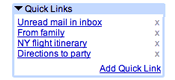 #1. Quick Links
Adds a box to the left column that gives you 1-click access to any bookmarkable URL in Gmail. You can use it for saving frequent searches, important individual messages, and more.
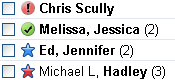 #2. Superstars
Adds additional star icons. After enabling this feature, you can choose which icons you wish to use in the "General" Settings page.
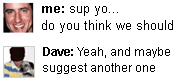 #3. Pictures in chat
See your friends’ profile pictures when you chat with them. This is similar to picture shown in Google Talk desktop client.
 #4. Fixed width font
Adds an option to the reply drop-down menu that lets you view a message in fixed width font. Geeks will love this I guess! 😉
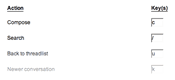 #5. Custom keyboard shortcuts
Lets you customize keyboard shortcut mappings. Adds a new Settings tab from which you can remap keys to various actions.
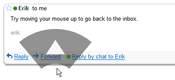 #6. Mouse gestures
Use your mouse to navigate with gestures. Hold right-click and move the mouse left to go to a previous conversation, move it right to go to the next conversation, and move up to go back to the inbox view. Works best on Windows.
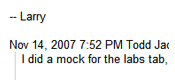 #7. Signature tweaks
Places your signature before the quoted text in a reply, and removes the "–" line that appears before signatures. Can’t use this and the "Random signature" Labs feature at the same time.
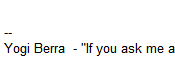 #8. Random signature
Rotates among random quotations for your email signature. Can’t use this and the "Signature tweaks" Labs feature at the same time.
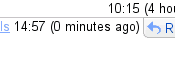 #9. Custom date formats
Adds options to the general settings page allowing the date and time format to be changed independent of language. For example, you can use a 24-hour clock (14:57) or show dates with the day first (31/12/07).
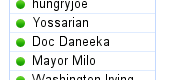 #10. Muzzle
Conserves screen real estate by hiding your friends’ status messages. I wanted this personally from long time as status messages create lots of scrolling work.
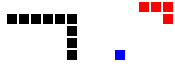 #11. Old Snakey
Kick it old school with Old Snakey! Enable keyboard shortcuts and hit ‘&’ from the main page to play a game of snake.
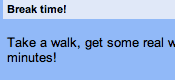 #12. Email Addict
Lets you take a break from email and chat by blocking the screen for fifteen minutes and making you invisible in chat.
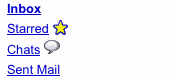 #13. Hide Unread Counts
Hides the unread counts for inbox, labels, etc. This will surely loved by lazy people who just don’t manage their mailbox and don’t care about unread mails!
A sweet warning…
Beta and lab edition releases are under-development releases. These may contains bugs, may break anytime and some of the features may change without notice. if anything goes wrong, use following URL to go back to stable version of Gmail. Better bookmark it… 🙂
Some feature are really nice like quick links & pictures in chat while some are disappointing like snakey! What I was expecting is to-do list management which I have been waiting for long time… 🙁
Related: Check Google Talk Lab Edition
10 Comments
How can i activate labs in my gmail?
help me…
give instructions…..to activate labs in excicsting mail a\s…
@Prasanth
Read this post again, I mentioned it already! 😀
Hi
what about accounts which have not Lab tab in their settings ?
what can I do ???????!
@Nima
You may be using Gmail in “basic HTML” mode.
Update to “standard mode”.
I guess lab feature are available for everyone now.
wat about accounts aithout lab tab?how can i activate it?
Where do i find a feature that enables me to read messages only when I open it.I don’t like the idea of see the message before opening.