This article is my best possible help for all orkut users, victim of some sort of impersonation. It will show you how to deal with your duplicate profile on Orkut.
To start with, here is what Orkut’s Impersonation Notification says,
“To file an impersonation claim, you must demonstrate that you are the person being impersonated. To be considered impersonation, the profile name will likely need to match (or be very similar to) your legal name.”
Point to be noted – Offending profile must have name similar to (if not exact) your legal name not your Orkut profile name.
There are few more things mentioned on Orkut help page. Read them carefully…
# Preparation Part…
- If you are not Orkut User – You can still file a claim without opening account on Orkut. But to get Orkut Profile Name & URL you have to seek help of a friend who have account on Orkut.
- Scanning a photo ID – As its mandatory to attach a valid photo ID, get it scanned as clearly as possible. If you are good at digital photography then you may try taking a snap of photo ID. But using scanner is always better! Also I will not recommend use of your college ID as its less authentic compare to driving license or national ID (such as voters ID in India). Update: Uploading photo is not required anymore.
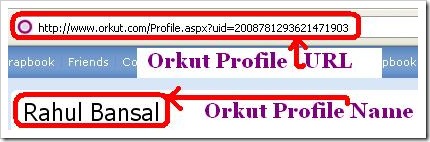
- Orkut Profile Name & URL – If you have never used orkut or very unfamiliar with its technical jargon then check following screenshot. I have highlighted orkut profile name and orkut profile URL below which will be needed to file impersonation claim.
# Filing an Impersonation Form…
Now open impersonation form. It has total 9 fields. Some are optional.
- Your legal name: Name of the document you are attaching.
- Your email address: Give an email address where orkut can contact you.
- Email address (confirm): (Same as above)
- Your orkut profile name (if you have one): (not needed if you have no orkut account)
- Your orkut profile URL (if you have one): (not needed if you have no orkut account)
- The fake orkut profile name: Copy and paste fake orkut profile name (see screenshot)
- The fake orkut profile URL: Copy and paste fake orkut profile URL (see screenshot)
- Please attach … photo ID : Upload scanned document here.
- Additional details (if needed): This field is optional but please try to give some important details which can help Orkut identify you as real an offending profile as fake.
After filling all details and submitting a form you will get following response…
“Thank you for submitting your report. We will investigate and take action as necessary. Please note that we will not contact you unless we need more information to review your claim. If you’ve reported a profile and continue to see it after a week, it’s likely that it did not meet our conditions for removal.”
# What if above fails…
DON’T…
- Ask your friend to report fake profile and making an impersonation claim on your behalf. This is not allowed by Orkut.
- Try or ask anyone to hack fake account. You may land yourself in legal troubles.
DO …
- Try to file another impersonation form. With uttermost care. If you are not sure about any clause/terms seek technical help. You may contact us.
- Try filing a complaint with The Internet Crime Complaint Center (IC3).
- Indian user may visit Cyber Crime Investigation Cell
No matter what happens, do not indulge in any criminal act like hacking or password stealing. Its always better to trust local legal authorities than a stranger claiming to help you in virtual world.
(Personal Note: Consider this as my replay to all mails/scraps/comments about the issue. I can not and will not hack any orkut users account for anyone. Not even for money or any other reason. So stop making me such idiotic offers.)
34 Comments
Good information, really helpful. Heard that, there is one more bug which displays the mail id of a person from the profile. Do you know about it? Is it true?
@Pavan
Not yet.. But I will surely put it on blog if I find something interesting! 🙂
thank you, man
@Tanyadi
Ur welcome buddy!
Welcome To Devils Workshop! 😉
hey rahul thanx yaar!!!
i got my hacked id deleted by google..
keep it up buddie…
@Shriya
Your welcome buddy… 🙂
Thanks for positive comments.
i dont want to delete my orkut profile but i want to hide it from others(the person is not in my list) for somedays ca anyone help me
@shriya – hi
yaar can u plz temme hw ur id gets deleted frm orkut which wuz hacked..can u plz help me out..its urgent
I had submitted an impersonation complaint last year but till now there has been no action taken. Meanwhile the profile s gettin worse each day.Please tell me how to remove it.I know the email id of the profile but….
this impersonation form is disgusting… i have filled the form completely … still it throws error saying that upload jpg image and enter a valid url.
@saloni –
May be its a temporary error or a bug.
Try sending an Email about it to the official guys.
@saloni –
You have to upload image and give valid URL.
Fill in the form completely…
i have filled the impersonation form completely … still it throws error saying that upload jpg image.Its a scanned copy of my id proof in jpg file…….plz help me….it goes worse day by day
@Ervil
Please cross-check image format of your scanned document.
It may have non-jpg extension or may be higher in size allowed by Orkut.
sry sry i was posted some wronge coment by widout seeing..my problem is yesterday my id was hacked by some1..n i tried to get it back from “forget my password”but stil im not getting the email from google team..now what can i do plzz can u suggest me..n i filled the form also ..bt im not getting reseting password link…..
Hi,
The information is really good but there is no option to upload a photo in the impersonation form.. Pls reply fast it is urgent.
@Ankit
The impersonation form has been changes since I wrote that post.
You can fill it without uploading photo now.
hey rahul can u plz help as one of my frnd who was added to my frndz list copyied few pix from my profile n sent it to my office facilities due to which i got in trouble but i m out of it now..i delted him from frndz list n i wana block his account as he has done this same act with one of my frnd aswel..plz help
@Chandan & Mita
Add that person to your ignore list.
If you still face trouble contact police.
Hi Rahul,
i really need your hard help. somebody is using my photos on his profile and blackmailing me. could you please tell me how can i remove my photos from his profile. please help me its very urgent and u can understand how important is a girl’s image.
please help me, either i want to delete that profile or delete the photos.
Actually my gmail id has been hacked and i use my orkut account using gmail id.The person who has hacked is now putting mischivious things on my orkut account.What to do now .plz help?
please give me a duplicate orkut website
hi sir we want to know how to we get the user id when we submmited the application of orkut
my photo my gmail.com me paset karna
hello my gmail id has been hacked and now will i get my email id password “[email protected]” please help meeeeeeeee.
and mail to me at “[email protected] “
@ sooraj
You need to reset the password of your own using the ‘Forgot password’ link on Gmail login page.
Sir, someone has made a fake ID of my on orkut when i reported abuse i got a form to fill i filled up the form and send to orkut with strong reason and information but thay didn’t take any action against the fake id, after this i reported abused about 5 to 6 times but orkut members still didn’t take any action against the fake id, i gave them the all information and my legal name is also similar to the fake ID name but don’t know whay they not taking any action.
Is there any way to delete the fake ID.
Please help me sir..
@sunil
May be reapplying for consideration may help.
please give me a duplicate orkut website
Hi
I tried it but i have got negative response from the orkut. they can’t help me. Is there any other way to delete my fake profile?
Someone changed my orkut password and security questions.Plz help me to recover the password..plzzzzzzzzz
I have one doubht..
some one hacked my account once. After that i changed my passwrd and security question. Is it possible to access that account again that hacker
someone commented on my snap in orkut album. the account id is not visible.how to get who has commented it and its account id