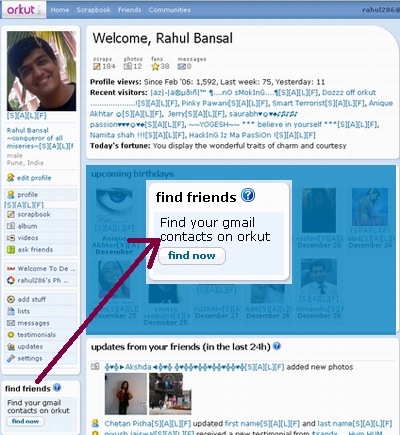
Certainly this is one of the most awaited feature on orkut! Other social networking sites like facebook, linkedin, etc had it from day one. And many not so popular social networking sites use this to welcome newly registered members under captions like invite your yahoo, hotmail, etc friends to blahblah site…
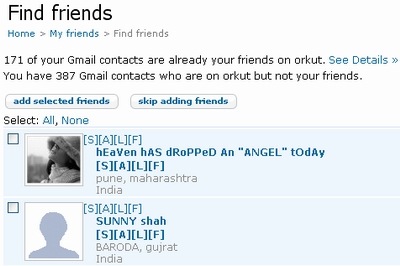
Now orkut bridged the gap by giving this feature to limited orkut users with Gmail account. Just Click on Find Friends as highlighted in above screenshot and you will be taken to next page as shown below from where you can choose to add your friends who are already on orkut or simply invite who has not yet joined the orkut!
#Some limitation of this cool feature… 🙁
- The find friends box will not appear if you do not use gmail or use gmail but its login is different from your orkut login.
- This feature is only available for your Gmail contact list. orkut doesn’t import address books from other email servers at this time.
You can read official orkut help page on this feature or just go on adding!
#Extra Hack:
If you use gmail but also use other services like yahoo, hotmail, etc… You can simply import other services’ contact list on Gmail!
Note that orkut can not import address book from other email servers but Gmail can! 😉
Have fun! 🙂
Update: Read Orkut’s official post!
72 Comments
how to join orkut friends in gmail?
@jaimin
If you mean how to invite them to chat, then go to their profile and start adding them! 🙂
no thanks
hai this is rani, iam scared of using this orkut because my brother told not to join in this things .pls suggest me it is wrong to use orkut and getting friends
its very goood but depned of nice friend…..if wana to joind the gruop & search a nice friend….
No filltetrization is there tell you brother you can
No,it is not wrong so do not be scarred & keep chating on orkut
no its a good thing to make friends.So its safe for you
it is nothing wrong to join in this things here u can meet lot of friends and learn new things but dont believe everyone and dont reveal ur personals ok bye take care ali
this is very useful our friends
@ rani:
There isn’t anything bad in using orkut by girls.. But my sincere advice is not to disclose your personal info. like (Address, DOB, Contact numbers, etc) and never ever upload your pics into it.. If you remember these things you’ll always enjoy Orkut or other social networking sites 🙂
hey dis is prashanti here.i feel dat der is nothing 2 sign in orkut
So many things are there need to see by colsed eye
I think one should never put anything personal on social networks, atleast on Orkut. 🙂
it was very beautiful
it’s good
that’s very nice
There ts nothing wrong to disclose your name and address and cotact number in orkut though it may not be misused
There ts nothing wrong to disclose your name and address and cotact number in orkut though it may not be misused
orkut is very can close with old friend and make new friend
thats vry nc.
thats vry swt
what is this man?i hate that type of activites.
i can not live without orkut.
I dont know what will happen to you if you are in UAE ? because orkut is blocked here… can u just help me?
i cannot live without orkut
its a bridge of connecting pepple
Friendship
I Love orkut and orkut friends
okut is the best
I Love All My New Orkut Friends….
hi dear friend !
hallo dear friends
i love all my friend s
orkut which helps in new friendships
hi this is anil
hello……….
Hey Rani stop being a chicken.Orkut isnt bad at all.Hope u ve gotten advice
This is a very good and if any is telling about this means he is really having some doubt in his mind always. so pls clear it and join this group always benefitted.
if my any friend is online in orkut i cant see them
my chat option also not working
in short my friend is online but i cant see to them in green light so chat fasility also not availbele
but few of my friend is visible to me but some is not
why this happen
thanx for advice in advance
in short my friend is online but i cant see to them in green light so i am not able to chat with them
but few of my friend is visible to me but some is not
why this happen
thanx for advice in advance
This is a very good and if any is telling about this means he is really having some doubt in his mind always. so pls clear it and join this group always benefitted.
hi!dis is sanya telling u abt orkut——dat ——-”””its fantabulous””’..:…
in short my friend is online but i cant see to them in green light so i am not able to chat with them
but few of my friend is visible to me but some is not
why this happen
thanx for advice in advance
They are invisible. Most people who do not want to be disturbed with chat while working or when busy online are invisible.
I love you all the web user good n8t
this is fantastic to talk with oldand new friends
Orkut is mind blowing.
such orkut is really mindblowing
Orkut is mind blowing
in short we can communicate fastly
Hi dear reader….orkut is very usefull to students….
Orkut is reallyyyyy…. fantestic,
Orkut is very useful for sutdents
orkut is magnanimas
how to find friends from orkut to add in fb acccount??
its good
orkut is very useful
Hai frds do u like frdship if u like frdship chat with me
WONDERFUL…
hi, i think orcut is just time pass
it is mind blowing
It is Great
It is better i just join orkut
Its a very good media to know about unknown people. thank you.
Getting gud frds is dificult . So selet frnds care fuly
Orkut is not only a networking site but it is whole world.
i think orcut is just time pass
it is very interesting net work to obtain new friends and new world
it is very useful
It’s very good to join orkut because everybody need a friend through orkut we connet frnds.
I think nobody is using orkut, as there is long gap between Santosh Kumar and Padmanabhan Pott.L