I use Google Calendar to create events and reminders especially for important events or even meetings. One thing it does allow me to do is schedule meetings or events and create reminders for me either through email or pop-up. It also allows me to Create an event in my calendar and invite guests to the event. The guests are notified through their email. If they have a Gmail account they can sync their Google calendar with the event I created.
I am not sure if you are aware of Attach Google Documents feature on Calendar which is still in Labs. This allowed me to attach a document to the event I was creating (see image below).
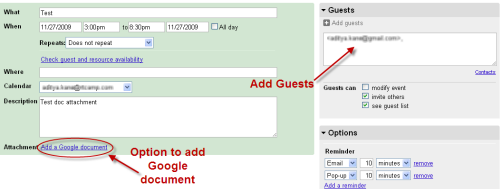
The best thing about this is when I create an event with a Google document attached and add guests they can also view the documents. 😉
This is ideal when you are creating events about a project and want to send over documents. Just attach them to along with the event.
To enable the Labs features, just click on Settings when on Google Calendar. Within Settings select Labs. In the list enable Attach Google Docs feature as shown in image below.
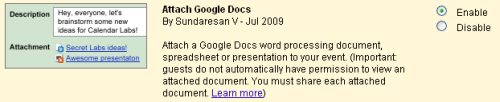
This will enable you to attach documents with any new event you create while using Google Calendar. 🙂
You must be logged in to post a comment.