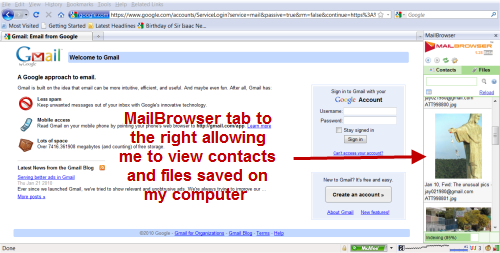
Personally I use Gmail’s Offline feature for being able to compose or access certain emails in case I my internet connection is acting up or if its not stable. But I like this new add-on software called Mailbrowser and I liked the easy way I could access contacts and attachment files at one side.
The good thing you will love about Mailbrowser is that it is not a web application and hence your personal Gmail details are not really stored online or on a 3rd party server. They are saved on your hard-disk itself. 😉
About MailBrowser
- MailBrowser works with Internet Explorer or Firefox. It saves all attachments and your contact list on to your computer.
- I did not have to log into Gmail to access my contact list or attachment files.
- A simple couple of clicks enabled me to send an email to someone in my contact list or even access the mail in which the attachment was received.
- It works with the browser and I tested it with Firefox. The tab neatly sits to the right hand side of the browser.
I was initially apprehensive about why you might need this extra bit of software to save your Gmail contacts and attachments on your computer when I already had Gmail offline on my computer. MailBrowser would actually be quite useful as you can sort of use it like a mail client. You can free up space on Gmail and delete old attachments. It is not a standalone software so it cannot be compared to mail clients like Outlook but its compatibility with browser does make it worthwhile to try out.
Link: Mail Browser
3 Comments
Nice plugin. Need to test this. Usually I don’t feel any need of a tool like this as I don’t get lot of email but testing a utility always fun for me.
Really Useful Post! Helped me