Most Gmail users will answer one! Rest will answer 2-3 or little more. But in reality, all Gmail users have infinite Gmail addresses even if they have registered for only one Gmail account!
All these addresses act as aliases to Gmail address you use and can be divided in three categories as explained below. At the end some smart tips are given to make use of these aliases to get more from your Gmail accounts!
So lets start with aliases now…
#1. googlemail.com alias
 Every [email protected] have a alias [email protected] by default. So even if you send me mail at [email protected] it will be delivered to my inbox as shown in following screenshot…
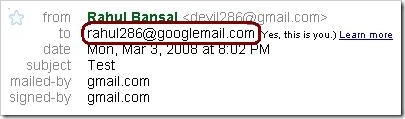
Googlemail.com is official domain for Gmail.com service in Germany, Austria and the United Kingdom. More information about this is available on Gmail’s wikipedia page.
This makes your address count: 2
#2. dot [.] alias
Gmail ignores dot [.] character in email address. Means all of the following are same…
- [email protected]
- [email protected]
- [email protected]
- … and all combination of dots
Check these screenshots…
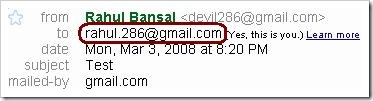
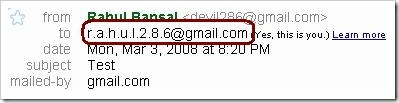
More information about this is available on Gmail’s Help Center.
This will raise your address count considerably. But still you can count them!
#3. Plus [+] alias
Now first look at this example – [email protected]
Now this is also same as – [email protected]
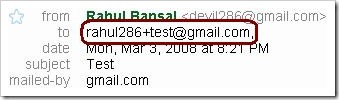
Gmail ignores plus [+] character and anything after that in ID part!
So anything+boldpartisignored@gmail.com is same as [email protected]
What about count now? 😉
#4. Combination of aliases
Yep, you can use above aliases in any possible combination. Check following screenshot, I used all three of above at once… 😉
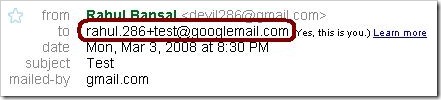
Are you still counting? 😀
Now you may be wondering what to do with these virtual infinite email addresses (or aliases). First give your original email address without plus and dots to your friends and other real people only. Now out of aliases I personally recommend to go for plus aliases as they are more readable.
Now comes some tips…
#1. Better Organizing Emails…
First create aliases like below…
- [email protected] for social networking sites like orkut, facebook, etc
- [email protected] for all forums you join on blog
- [email protected] for all commercial sites and so on…
Next create labels like social, forums, biz, etc and finally create an individual filter for each alias + label combo!
This may sound a lot of work but once its done, it saves your time forever! 🙂
#2. Catching Spammers…
Many websites ask for email addresses. If you suspect the website may spam your inbox in feature, use a Gmail alias instead of real email address.
If you get spam mails targeted to alias in future you may assume website is affiliated with spammers!
Note this method is technically not full proof as website may strip extra characters from email addresses… 🙁
There can be more smart usage of this email aliases. If you have one, please let us know! 🙂
20 Comments
excellent!!
this was really very helpful and knowledgeable 🙂
@Bean
Thanks Bean! 🙂
grt thing… i m blogging it… and refering ur URL…
🙂
@Techdudes.blogspot
Thanks buddy! 🙂
Hey Devil…
Check this post on official Gmail blog!
Looks like Gmail Team is reading ur blog… 😀
hey good yar..and I also like your new website look …follow web 2.0 design concept to improve your web look
@Santosh
Thanks for suggestion santosh!
But it will be great if u can give some example sites which can help us in redesign.
We are planning a major design change in June 2008..
Thanks again for your time… 🙂
Excellent findings
@Pradip
Thanks Buddy! 🙂
Hey…Ðis is a gr8 way to filter mails…
But im gtng sm problem….
I wanted da forwarded mails from all my email ids to land into a label in my master gmail id….
So i forwarded mails from other ids to [email protected] & den created a filter in my master id to categorise all mails to myid+forward@gmail to a label named ‘forwarded mails’ but to my surprise im not getting any mails to my master id from all da other ids…. 🙁
what can i do….??
@Pranav
Can you write in more details what steps you have followed…
Try to write one-step on one-line so I can get where things are going wrong.
Im using more than 1 gmail ids…So to make things easier, i forwarded all da mails to my master gmail id
so here r da steps….
Firstly i forwarded all da mails to
[email protected]
den..In my master id ,
i created a filter
& in da ‘to’ field , i entered
[email protected]
den i applied it a label named ‘forwarded mails’
Now im getting da forwarded mails from all my ids but they r not getting ‘labeled’.. 🙁
i ve tried to delete labels & start everything from scrap..But stil its not working…….
I hope that da situation is much clear now…….
I wanted da tags mainly coz it becomes very difficult to differentiate between forwarded & other mails……
@Pranav
Everything seems right…
Just do one thing.
1. Find a mail WHICH is supposed to be labeled
2. There is Reply option with small drop-down menu on right side (near show details link)
3. Click on that arrow and select “Filter Messages Like This” option
4. Gmail will automatically open filter wizard with first step completed. Just fill in the rest of the details.
Let me know if this works…
Thanx for help buddy…
But im on mobile..{basic html view..I cant view gmail in classic view} 🙁
so i got to go to a cybercafe or in worst case share my underwear with a frnd of mine..!!! 😮 😉 {yeah…I wil try to avoid da latter….}
But stil…Meanwhile can u get some othes way to get things going….Or plz check da basic html view with any options lyk those have mentioned above….?¿
{i checked myself but din find nythin related to it}
@Pranav
I am myself away from PC for a week…
I will update once I get back to Pune as I will be accessing net via Mobile thats too at few kbps speed from remote places… 🙁
This is Awesome Rahul. I knew about the . trick but never knew that using + followed by anything will still get the mail delivered to my inbox.
I must give you a trackback for this. Fantastic is the word Man!
@Vaibhav
Thanks Vaibhav. 🙂
Is there a way to see how many gmail addresses you have open? For instance, I know I have a bunch but I want to see how many and which ones I have. Thank you.
Great post!
HI, I have opened a few email accounts in the past but forgot my email addresses. Is there a way to list the gamail addresses I have?