
A new feature on YouTube makes it simple to share your favorites videos with orkut friends.
As posted by Narayan Kamath on official orkut blog,
Have you ever been watching a funny video on YouTube and decided halfway through that you must share it with your orkut friends? Previously, you had to go to your orkut "favorite videos" page and copy-and-paste the video URL to post these clips. Now…
Here are simple steps to a share a video…
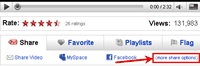
1. Click on more share options link on Share tab.
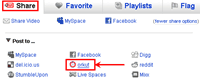
2. Orkut option will appear. Click on it. [Note: Orkut option will only appear if you have integrated your YouTube with Orkut/Google Account.]
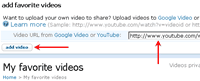
3. You will be taken to orkut favorite video page. Favorite video page will open with YouTube video URL in place, just click on add video button. Thats it!
This will work only if you use orkut/google account to log into orkut. Here is a way to do that. 🙂
One Comment