 I recently came to know of about this. Well, I had to because when I was in college. I hate using the touch-pad of my laptop. So I use the numpad instead to control my mouse pointer rather than a mouse or the touch-pad.
Follow the given steps to activate the Keyboard Mouse:
To edit this feature, first you should be logged in your Windows account with administrative rights.
To activate this feature, Press Alt+Shift+NumLock keys. Then you will receive a small MouseKey box.

To keep MouseKeys on, click on Ok button.
Click on Settings button, if you want to adjust the mouse cursor settings.
Here a new dialog box will appear with the title Settings for MouseKeys, now you can manage all mouse settings for example mouse cursor speed, acceleration and some other features.
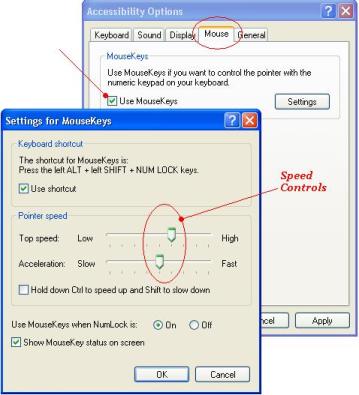
Now using Numeric keypad, you can move your mouse pointer.
The Controls are :
- 1, 2, 3, 4, 6, 7, 8 and 9 keys are used to move the mouse cursor into 8-different directions.
- Key 5 is used as mouse click button.
- Insert[zero] key used to hold down mouse button.
- + Sign used to double click on any object.
- Delete button used to release the mouse.
Click on NumLock button to disable this keyboard mouse feature.
 In Fact when the Keyboard Mouse is On, an icon will show in the taskbar in right corner near system clock.
Advantage :
- It is a great alternative to your actual mouse or your laptop touch-pad.
- It works better & faster than your laptop’s touch-pad.
- Since 8 keys can control its movement, the mouse pointer gets high precision.
- If you are a laptop user, you don’t have to carry a mouse with you.
- Now, you don’t have to worry in case your mouse or touch-pad gets damaged.
Disadvantage :
- This feature can’t be used inside fullscreen PC Games.
- Most laptops (unlike mine) don’t have separate numeric keypad.
- Its not known by many, so most people will laugh at you if you tell them that you control you mouse with your keyboard.(trust me, they do laugh at the first time).
16 Comments
Actually it would become problematic if u control ur mouse with numpad ingame 😛
Most FPS games do have keys dedicated to look around instead of mouse , just try using those 😉 The game literally changes…
I remember using this option in my school running on win98, When students use to remove mouse balls . So this was only way we can use mouse.
Quite a handy option if u cant find your mouse . Nice post.
@Gaurav – Yup, thats Right … but the best thing about using Numpad Mouse Controls in a Game is that it gives a lot of accuracy while aiming at Targets while Sniping
it`s good to control the cursor with keyboard but even it`s top speed is low and it`s not at all convenient according to me….
but it`s good for emergency cases like disability of the touch pad or to use a comp. without a mouse….
@Sauravjit Singh – Now, thats strange, Maybe you are right… But My Mouse Pointer works really well with the Setting As Given In the Screenshot Above. In fact its working great on my friend’s PC too..
Make Sure you have you keyboard Driver Installed (the one that came with the keyboard CD)
I think, for precision gaming you should go with a gaming Grade mouse with Optical sensors (laser sensors not preferred 😉 ) along with a Gaming Mousepad (control surface)
Anyways, I had used this trick on one of my friends PC whose PS2 port of Mouse got damaged… And yes, you can use it with laptops 🙂
@Debajyoti Das – yes bro I am right 😉 as I am using this technique since from last 6 years starting from my school labs who`s mouse are not working most of the time.
Nice and clean trick if your mouse is dead.
Thanx, my mouse was dead and i was only able to use basic functionality of keyboard(and i didn’t know it completely).
But you saved me.
Thanx once again.
I am overjoyed to know it.
Dear friends really its nice
Thank u…. one day my mouse was not working, by that time one of my friend active this feature in my system, but did’t tell how he did. konw i can…becoz of u…once agin thanku very much.
Pradeep Sukumaran
Thank You A Lot. This is a very nice feature. It worked on my PC but the problem is it’s not working in my laptop because my laptop does not have separate NumPad. So Plz tell me what to do Plz…..
Very-2 thank u my dear friend. My mouse is not working but i using this trick and i use keypad like as a mouse . thank u again.
it’s quite good but there’s scroll problem i am not able to scroll down page during surfing any solution??????????????/