 Gmail Labs has released a new feature called Message Translation which helps you translate e-mails written in foreign languages into your own language. This feature is very handy for those who receive e-mails from others in various languages.
Enabling Message Translation Feature
To enable this feature, simple follow these instructions:
- Login into Gmail
- Go to Settings
- Go to Labs
- Look for Message translation and enable it

- Click on Save changes button at the bottom
Screenshot
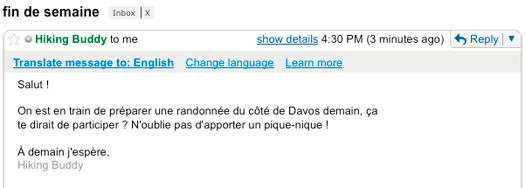
Gmail tries to auto-detect the language of the message, and you can also control the language you want the message to be viewed in. You can also print the translated version of the e-mail.
(Source: Official Gmail Blog)
[Editor’s Note: This post is submitted by our guest blogger Gautam. He works for OrkutPlus.
If you too would like to write for Devils Workshop, please check this. Details about our revenue sharing programs are here.]
2 Comments
This is good..atleast I can read all spam messages coming from Russia or China 😛
very useful for Gamil users who have foreign freinds