 There is a limitation for every webmaster is to create and update his blog/website regularly. But user generated content like that in forums and social networking sites is automatic and a little moderation and selection would result in extremely targeted traffic and revenue. There are different kind of forum softwares available in internet, both free and paid. Every good webhost will be having auto script installers which includes free forum softwares like phpbb and SMF (simple machines forum). But its difficult for a newbie to understand the installation process and it gets more complex in free web hosting services like 000webhost. So here we will discuss the manual installation procedure of phpBB forum software on 000webhost.
Sign up with 000webhost here.
First we need to point nameservers of the target domain to 000wehost account. Go to your control panel provided by domain registrar and enter nameservers as ns01.000webhost.com and ns02.000webhost.com.
Now Wait for 24 hours for the complete DNS transfer.

After this open your 000webhost account and click on create new button on top left.
Now you need a sub domain to which phpbb forum can be installed.
As shown in the above screenshot , go to control panel and select sub domain from domains option.
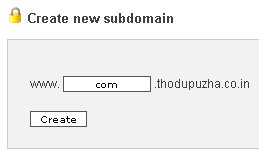
Crete a sub domains shown above.
Now go down through control panel and select “another file manager “, and double click on public_html folder. Here as shown above, I have created a sub domain com.thodupuzha.co.in . In my case it will create a new directory in public_html folder as shown below. This com folder is where we are going to install phpBB software.
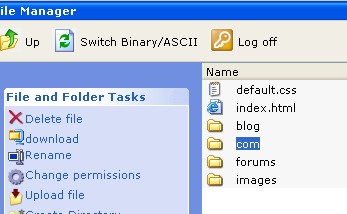
So in browser the forum will out put as www.thodupuzha.co.in/com . You can alternatively use forums instead of com.
Lets start installation by downloading phpbb forum software here.
Unzip the files to desktop.
Upload the files to forums folder using a free FTP software like CoreFTP.
Use View FTP details from Control panel to fill FTP options on CoreFTP. You can use this tutorial if you are new to CoreFTP software.
Make sure that you have uploaded all files from the unzipped archive.
Run phpbb installation by typing http://www.mydomain.tld/phpBB3/install/ or browser URL bar.
Now phpBB installation window will appear. Click on continue.
In next page the phpBB software will check for compatibility issues with server and file types and shows few errors.
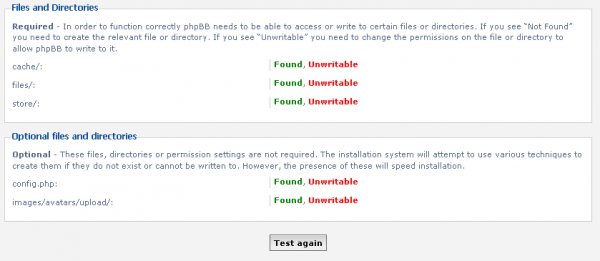
The above files in the phpBB installation directory are unwritable. Open com(sub domain ) folder > phpBB3> Now you will see a set of files associated with phpBB installation. Find the above unwritable files from above pic and change its permissions as shown below.
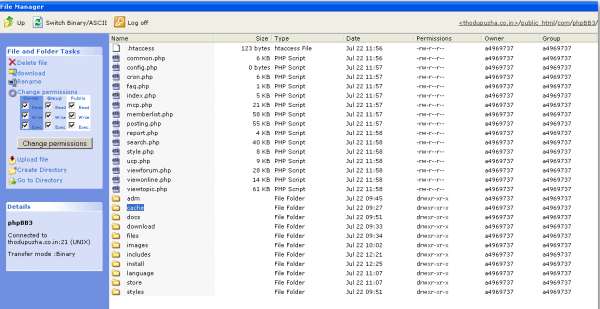
Make all file writable and proceed with installation.
Next step is to create databases.
Open 000webhost control panel and click on MySQL. Create a new mySQL database for phpBB installation.
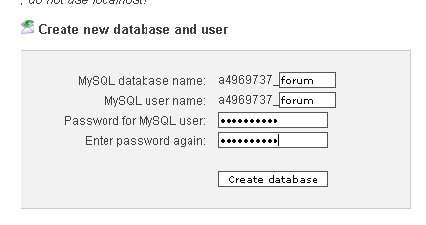
Now you will be redirect to a summary page with details of database. Use these details to fill create database process in phpBB installation. No need to enter database server port.
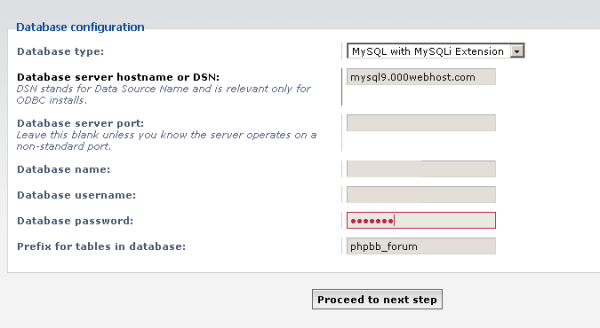
Now the process of installation of phpBB is 000webhost is almost over. Click on continue and complete the general forums settings, admin user name, password etc. In final page you will see a warning message. This is because we gave write permission to sensitive files in phpbb installation directory. Revert back them to original one, and then login to your new phpBB forum .
[Editor’s Note: This post is submitted by our guest blogger Smartin. Smartin is a Blogger, web designer and SEO enthusiast from Kerala, India. You can know more about him at his website www.smartin.in or @smartinjose on Twitter .
If you, too would like to write for Devils Workshop, please check this. Details about our revenue sharing programs are here.]
32 Comments
Thanks Rahul for publishing my article .People are looking for more easy ways to install forums and other scripts . But I hope this would help someone in needy situation. Btw , my website link in this post is not working 🙂
Nice to see a guy from kerala..
Dude I’m also from kerala..
🙂
Hi Arjun , Glad to know that you are also from Kerala . Btw , why there’s a malware warning on your site ?
thanks! bt 000webhost is not offering free hosting anymore!
@Jatin Sapra : I don’t think so .See I made this blog post with 000webhost account started recently .
Cool! I shall be trying out phpbb 🙂 btw hosthelper.com also gives reliable server response with 500mb of disc space and 5 gb monthly bandwidth! its been 5-6 months I have applied for 000webhost but still no response lol 😀
Or you can also also try awardspace. But I not at all recommend 07x or byethost (worst free host I have found ever)
Hi Swashata , Thanks for your free hosting recommendations . Actually free hosting is not a replacement for payed hosting . But services like 000webshost are best for learning .I spend some time on research before posting this article 🙂 , which otherwise takes only seconds via fantastico and other auto installers .
Yaa thats true! If you are doing this for only learning purpose then why dont you try out XAMPP. Check the first and 2nd part of the php tutorial here at devilsworkshop! You can then host files which you need for your learning locally! It will save loads of time for us :)… Hats off to you for your detailed tutorial mate 🙂
Thanks for your appreciation .I will check out that series .
Just wanted to say hello all. This is my first post.
I expect to learn a ton here.
Thank you for your good information.
amd wow is one of the best wow private server, instant 70 high rate
I have got a good wow private server site for you: http://www.amdwow.com
Hi nto All.
My computer worked not correctly, many errors. Help me, please to fix errors on my PC.
I used Windows XP.
Thanks,
Pafovalia
Thanks for the article, very damn helpful.
At the end I still get this warning:
“Please delete, move or rename the install directory before you use your board. If this directory is still present, only the Administration Control Panel (ACP) will be accessible.”
So, as you said, I reverted all the permissions I edited for the installation back to normal (removed writing permission), but the error persists… Any idea?
Great Blog! Compliments on the fantastic job!
hi there! I am new to the board and just wanted to introduce myself 🙂
@venusesobn Welcome to our community buddy 🙂
Hello Everybody,
I am new member here
I just lately discovered this place and so far i have discovered lots of great information here.
I’m looking forward to connecting and contributing to the forum.
@SpewmepeNen Welcome to Devils Workshop.:D Hope you would have great reading with our community.
Hi i did everything the tutorial says but after signup you can click on forwarding to this address http://err.000webhost.com/
please tell me how to update namesever of my domain in http://www.000webhost.com
Can anybody teach me?
this really helped thanks
Really nice! I was able to put together the forums module in less than an hour with your article. Thanks.
Hello devilsworkshop.org. I found your web site via Google while looking for a similar matter, your web site got here up. It appears good. I have bookmarked it in my google bookmarks to come back later.
Where could I get coupons with further option to optimize my web site?
How to get multiple C class IP addresses?
Does a web hosting coupon save our money?
What kind of web hosting coupon ought to I choose?
How may I get low-cost and dedicated server offer from my host?
How to make your mind up on a sensible VPS setup for net hosting?
Hi, this is praveen hegde, I was searching for this whole night finally got your step by step procedure, it is really informative.
wonderfull job! please keep it up