 After my last post on my experience with Indiatimes domain service, I got a couple of questions asking how to change the dns settings for domains registered with Indiatimes.
As I already mentioned in that article, Indiatimes does not provide total dns control to its customers. There are, however, two ways you can get your dns settings done.
1) Providing details to Indiatimes tech-support team
You can mail the Indiatimes web-support team at “websupport[at]indiatimes.co.in” with the required cname, aname and mx records. For me it took 5 days, 4 e-mails and 5 phone calls before the changes were finally made, but ideally you will get it done within 2 working days.
2) Manage your dns through another domain vendor who provides total dns control
This is my preferred way, because you get full control of your dns settings. There are many registrars who provide this service for free. I will tell you how to do it with GoDaddy Offsite DNS.
i. Login to your GoDaddy account and go to https://dcc.godaddy.com/default.aspx?activeview=offsitedns&sa=

iii. Enter your domain name in the domain name field and click OK.
iv. Wait for a couple of minutes (refresh the screen if required).
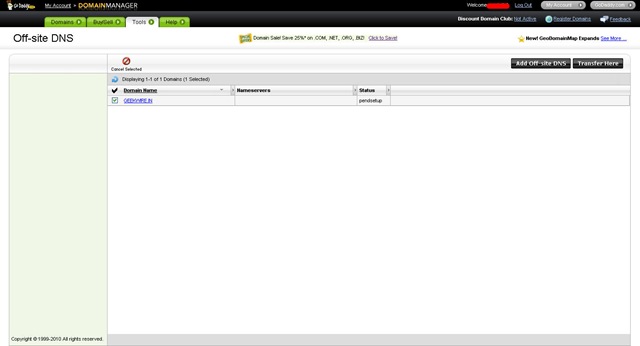
That’s the first part. To complete the process you will have to update the domains NameServer’s.
v. Login to your Indiatimes domain manager.
vi. Click on Name Servers.
vii. Update the nameservers with
mns01.domaincontrol.com
mns02.domaincontrol.com and save settings.
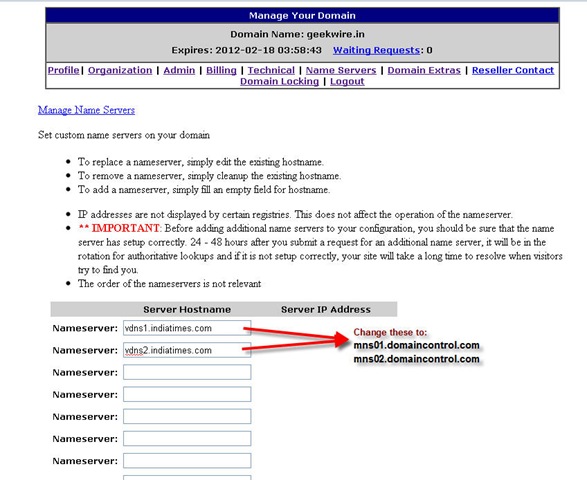
That’s it. Within 24-48 hours your nameservers will be modified and then you can enjoy full dns control through GoDaddy. Thanks Bisomber for the tip.
6 Comments
Thanks for sharing this information 🙂
Really helpful for managing Indiatimes domains…
Glad that u liked it Hemant.. hope it solved your problem..
Fantastic Anshul! Neat explanation!
I just modified the name servers. Let me wait for 24 hours now 🙂
Thanks Praveen. Hopefully within 24-48 hours the nameservers will get modified.
You are great man. I seriously feel I made the biggest mistake by buying from indiatimes domains. But thanks to you can you also tell me how to get rid of this. I mean change my domain registrar,Please
THANKS a ton man. Hopefully in 48 hours it will be done.