With recent launch of orkut’s country specific sites, all greasemonkey scripts stopped working. The reason is most greasemonkey scripts are domain specific and at the time of writing them, they were coded for url http://www.orkut.com which is now changing to http://www.orkut.co.in and so on depending on users country.
So all greasemonkey scripts for orkut needs to be changed now to reflect this domain change. Listed below are steps need to be followed by users and developers to make your favorite greasemonkey scripts work again on orkut…
For GreaseMonkey Script Users…
Just go through following steps for each greasemonkey scripts you want to modify…
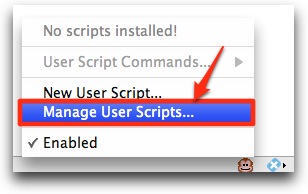
- Open Manage User Scripts option from Tools >> Greasemonkey menu or right-clicking on small greasemonkey logo in bottom-right corner of your firefox.
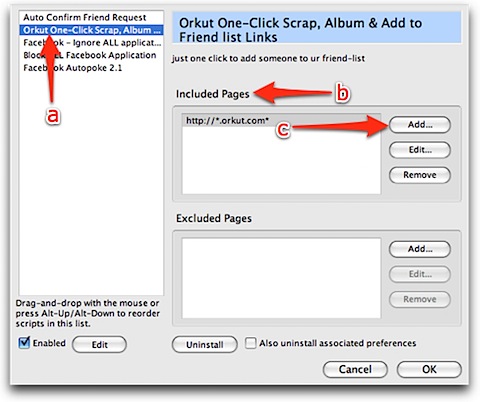
- A wizard will open like below. Then…
- Click on a script you want to edit from left side menu.
- Then Click on right-sides included pages list.
- Then click on Add button.
- Clicking on Add button will open a pop-up. Put orkut’s domain name you have in your country their. Ex: http://www.orkut.co.in/* for Indian orkut users. Note /* at the end of domain name. You must not forget it!
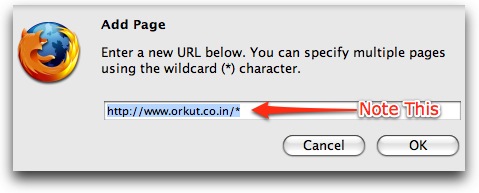
- Just click OK and the script will start working. 🙂
For more detailed greasemonkey tutorial check this post!
For GreaseMonkey Script Developers…
If you are a newbie greasemonkey script developer then you may be wondering about long list of orkut’s country-level domains.
But with one small change in your scripts you can make them work with all orkut sites. Here are the steps…
- Open your greasemonkey script is editor.
- Go to @include line in ==UserScript== header.
- Change http://*.orkut.com/* to http://*.orkut.*/*
This will make script work with all orkut domains plus few more domain like http://www.orkut.pk. But rather than listing all countries and making mistake on the way, this way is full-proof. Its also simple as all you need is to replace com in orkut urls with a * (asterisk).
You can do try-catch type nesting around your domain sensitive codes so that they will not clutter javascript error console in firefox. But this part is optional so don’t bother much if I sound like alien… 😉
I guess this answers all questions on the this issue. Sorry for delay in response as I was away from this workshop.
About our greasemonkey scripts go, you can just update them by installing again from respective locations. I have updated all of them and you can find them at one place, thats here! 🙂
Related: Shortest Greasemonkey Tutorial
14 Comments
these scripts rock!!!
@ravindra
Glad to know that you like these scripts… 🙂
is greasemonkey compatiable with FIREFOX 3 ??
@shubh
yes… 🙂
NO!!!
This script doesn’t work now …..
In fact there is a much simpler method According to me…
Instead of configuring the scripts..
Simply change the Domain from .co.in to .com
Read: http://realtrix.blogspot.com/2008/07/change-from-coin-to-com-in-orkut.html
This Change takes only 2 sec.
@Debajyoti Das
Typing * takes less time compared to co.in. 😛
Also this makes your script compatible with all orkut domains.
Plus if you are using proxy then co.in may break your scripts.
What if you want to upload modified script again or share it with your friends! 😉
All scripts made by you are obsolete.. Any idea of updating them….????
@Srinivas
You can upgrade them if you have time and if you know javascript.
How to unlock scrapbook in orkut
How to increase members in one of my orkut community
Nothing is working..can some one please help me out
whenever i use scrap all script..it show that scraps are sent to every person but i hv always found that i myself get the scrap which was supposed to be in all other’s scrapbook. so no one gets that scrap.
i have done all d thngs you mentioned above bt the scropt still not working pls guide me..!! 🙁