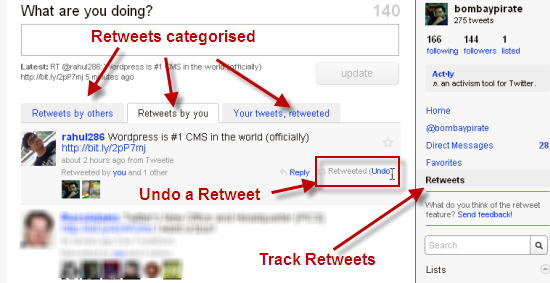
Twitter has released the Retweet feature on its website albeit the feature is still in BETA. I have written previously about it, but my Twitter account is now part of the beta experiment, hence I was able to experiment a bit with Twitter’s ReTweet feature. I liked a few things but I think there is room for improvements. If you see the below image after logging into your Twitter account, your account is also part of the experiment. 🙂

The Good
- There is no need to copy-paste or use the various desktop applications to send a Retweet. Click on the Retweet button on the tweet you are reading and it is sent to all your followers as Retweet.
- There was a way for me to keep track of all the Retweet activity by checking on details like Retweets by others, Retweets by you and Your tweets, retweeted. 😉
- I liked the feature where I could undo the Retweet. This is great option if you have inadvertently done a Retweet to a spurious link by someone.
The Bad
- The Retweet option does not show up when you look up tweets in a list. This means if I am looking up tweets in my list I need to visit the profile page to send a Retweet.
- I guess this is because it it not integrated with Twitter Lists. I hope this is a temporary thing, as I would find it quite cumbersome to visit the profile of someone I am following every time just for sending a Retweet.
Follow us on Twitter: @devils_workshop | @bombaypirate
6 Comments
Hi Aditya, think this is my first comment on “Devil Workshop”. You have covered nice points here. Retweet is a nice feature and that really helped Twitter in spreading the 140 char network. List finding is really cool and I think twitter will certainly integrate RT on lists in coming days. Thanks for sharing this pros-cons list.
@Sanjeev: Thanks and happy to know you found the post interesting. Do keep reading DW and keep commenting to let us know what you are thinking.
I did not sign up for beta testing, but from what you have listed above, it sounds cool. As Twitter evolves more, the issues will probably get addressed and maybe even new features will appear.
It could be a great help in spreading a good post, retweeted.
@Gaurav: Thanks, following you on Twitter. @bombaypirate
I Used to use this RT function.
I don’t anymore!
For the fact that no one else sees your RT apart from your followers, so you don’t get your RT seen on the search nor on their timeline and it is very hard to track!