 Here is a pretty cool tool that I came across – it allows bloggers to easily add text-to-voice capabilities on their blogs or on any other site for that matter.
License
Select your choice of code / tool as per the usage requirement. The codes / tools are available as an easy download and are free to use and distribute.
Features
The tool supports following functionalities:
- Choice of selection of male or female voice options by users
- Language support for English, Hindi, Spanish, Italian, Portuguese and Catalan
Availability
The tool is available as:
- iGoogle gadget, Facebook widget and a browser bookmark for normal users
- A WordPress plugin and generic blogger template for bloggers
- A Joomla plugin for websites on Joomla platform
- Various other combinations as website resources for webmasters


Steps to use vozMe on WordPress based blog
- Download a file vozme.zip from webmasters section
- Extract the compressed file
- Add the folder vozme to /wp-content/plugins/
- Goto WordPress administration tool > Plugins
- Click the “Activate” link within the vozMe plugin
- Access “Options > vozMe” and change options settings
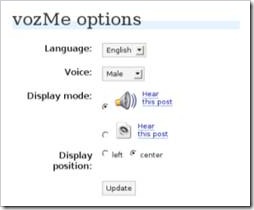
Hope you find this tool useful for your blogs or for the internet browser when you have to read long text files and don’t feel like straining your eyes.
Link: vozMe
4 Comments
Thanx a lot!!!!!!
This is a great tool. I added this to my website.
Once again thanx.
@Alok,
That’s awesome. Glad it helped 🙂
vozme is very useful for poscasting
@venkat,
Yes, useful for podcasting too. Haven’t really tried it though.