 This is my second post on Devils Workshop (first is here). In this post I am posting about how to can add a “Save as PDF” button to your blog so that your readers can save your article for offline viewing and for sharing with others.
This is very easy to use hack but still backup your template before doing anything. Refer my previous post, for details about backup procedure.
This hack uses FreePDFConverter service, which is free as suggested by its name.
Steps:
-
Now go to your blogger dashboard click Edit HTML and then choose expand widget template option.
-
Then using your browser search feature search for <data:post.body>.
-
Once you have find it, add the following code after the <data:post.body> tag in your blogger template and hit Save Template button.
Codes:
<script type="text/javascript">

</script>

<script src="http://web2pdf.freepdfconvert.com/pdfbutton.js" type="text/javascript">

</script>
Screenshot:
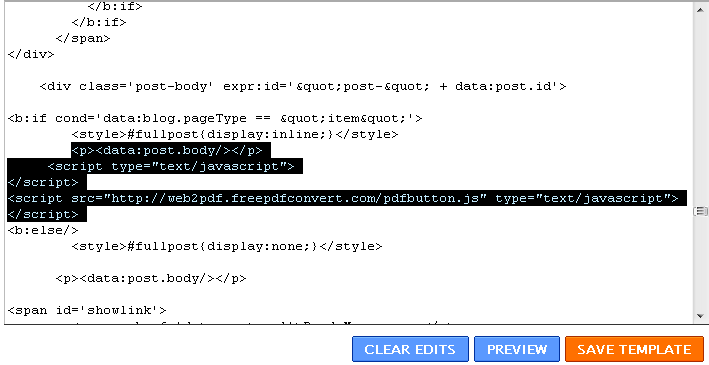
(click on image to enlarge it)
If all goes fine, you will see a button like below after your every post.

Enjoy this hack and please feel free to ask your doubts about it.
18 Comments
Hey dats a kewl option.. but unfortunately it does not work for blog contents written in any other language than english i guess .. usually when you write it in hindi or malayalam or any other regional language, if there is no font installed in the client system you cant read it.. i thot this wud b a wonderful option to solve it.. but when u conver the content to pdf using this script. only the english part in the posts comes out, the remaining content is blank !! any solutions ?
yes only if the browser have regional fonts.
for hindi fonts
http://mofpi.nic.in/loadfonts.htm
da system has regional fonts.. i can read that in the browser.. cannot convert.. i believe it is coz the site which is converting does not support other fonts
Is there anything like this for wordpress?
Just one small correction..
Image shows post.body/ closing, you’ve forgotten to put the / in the post.
Nice trick.. 🙂
I think you should create a temp. blogspot blog and then give a demo of each article you write about blogger there so that we can actually see and work out…
Nice Trick
But it prints the whole page . Is there any option by which we can print only post ??
Thanks..
@Pushpinder
demo site
http://fnb-test.blogspot.com/2009/02/hello.html
this is demo blog i have have included this hack in it.
@kaushik
no worry it will work either.
Cheers !
wow…this i need it thanks very much…
Is there a way to get only article content as pdf in Blogger Blog?
@prateek
Am looking for your request……….
There is a easier way, i just saw in Gadgets list.
Just go to Add new Gadget and Search for “PDF”, you’ll see a
nice Gadget.Then you’ll get more visitors because they can
convert your blog pages and more importantly their own documents
to pdf.
@north
thanks for the tip but @the time when wrote the post the gadget was not avialble
Heck of a job there, it abosltuely helps me out.
very informative article.thanks for sharing…