Major Update: This plugin’s new version has been released with many new features like:
- Zero changes requires on WordPress-side. Plugin handles everything automatically on WordPress.
- New configuration wizard help you setup redirection without much efforts.
- Supports importing from multiple Blogger.com blogs.
- Add supports for “rel=canonical” & “meta-refresh” tags on Blogger.com which will speed-up redirection. This will help search engine update their index faster.
Link: Blogger to WordPress Redirection Plugin
Update: This plugin maintains permalinks but in case you want to preserve Google Pagerank and other search engine ranking, please read this new complete tutorial first.
If you have imported your blog from blogger (blogspot.com) then you might be redirecting visitors from your old blogspot blog to your new wordpress blogs HOMEPAGE. While this approach ensures that you get all the traffic redirected from your old blog to new blog, a visitor may feel lost! What if a person is referred to your old blog via search engine or other link listings?
So this plugin just takes care of this part. It checks for which post people were looking on old blog and then redirect them to same post but on new blog! See following picture which will give you brief idea about what you can accomplish using this plugin…
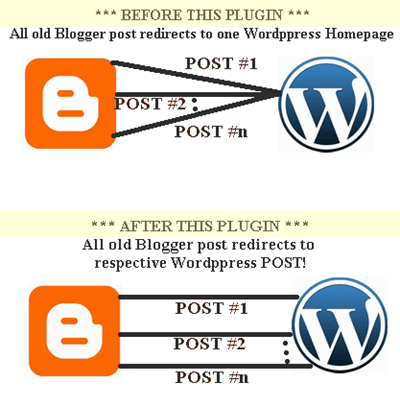
This plugin assumes following things:
- You used wordpress blog importer while importing your blogspot beta blog.
- You put redirection code in your old blogspot blog. An example of code is attached below. I strongly recommend using it only.
- You have imported only one blog. In next version I will remove this restriction so that you can import (or say merge) two or more blogspot blog into one new wordpress blog.
Installation (Blogger Blogspot Part):
- Log into your blogger account.
- Select old blogspot blogs template/layout. If you are using new custom layout, use “Revert to Classic Template” option on Edit HTML.
- Go to “Edit HTML” tab.
- Put following codes there with one important change and save changes.
(Important: Replace http://www.devilsworkshop.org/ in following code with your wordpress blog URL)
<html>
<head>
<script LANGUAGE="JavaScript">
<!--
window.location.replace("http://www.devilsworkshop.org/");
-->
</script>
<noscript>
<meta http-equiv="Refresh" content="10; URL=http://www.devilsworkshop.org/"/>
<meta http-equiv="expires" content="10"/>
<meta name="Description" content="301 moved permanently"/>
<META NAME="ROBOTS" CONTENT="NOINDEX, FOLLOW"/>
<META NAME="GOOGLEBOT" CONTENT="NOINDEX, FOLLOW"/>
</noscript>
<title>301 moved permanently</title>
</head>
<body>
<center>
<h1>Devils Workshop</h1>
<p>has been moved to new address</p>
<a href=" http://www.devilsworkshop.org"> <h1>http://www.devilsworkshop.org</h1></a>
<p>Sorry for inconvenience... </p>
</center>
</body>
</html>
Installation (WordPress Part):
- Click here to download Blogger To WordPress 1-2-1 Redirection Plugin. A file rbBloggerToWordpress.zip to your PC. Unzip it.
- Upload rbBloggerToWordpress.php into ‘wp-content/plugins’ folder.
- Go to plugins option under wordpress’s Admin panel. You will see a “Blogger To WordPress Redirector” Plugin Listed there.
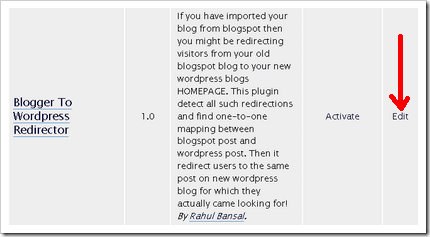
- WAIT! Do NOT click Activate. First Click Edit.
- On next screen put your old blogspot blog address next to $oldBlogURL variable! For ease search rb286.blogspot.com and replace it with your blogspot address. Sorry for this manual work, I will automate this step in next version.
- Then click Update File link their to save changes.
- Go back to plugins page and this time Activate the plugin!
That’s it! This plugin will now onwards map your old blogspot post to new wordpress posts on 1-to-1 basis.
Known Issues:
- Popular desktop blogging client Windows Live Writer stops working if you use this plugin. But there is temporary workaround. Disable the plugin & paste following code into current templates index.php [i.e. Main Index Template] before everything else! [Path: Admin Dashboard >> Design >> Theme Editor]
#Code: [Note: Replace rb286.blogspot.com with your old Blogspot address]
<!--?php
oldBlogURL = "rb286.blogspot.com";
$ref = $_SERVER['HTTP_REFERER'];
$refarr = explode("/", $ref);
if ($refarr[2] == $oldBlogURL ){
  $bloggerurl = '/'.$refarr[3].'/'.$refarr[4].'/'.$refarr[5];
  $sqlstr = " SELECT wposts.guid FROM $wpdb->posts wposts, $wpdb->postmeta wpostmeta WHERE wposts.ID = wpostmeta.post_id AND wpostmeta.meta_key = 'blogger_permalink' AND wpostmeta.meta_value = '".$bloggerurl."' ";
  $wpurl = $wpdb->get_results($sqlstr, ARRAY_N);
  if ($wpurl){
      header( 'Location: '.$wpurl[0][0].' ') ;
      exit;
  }
}
?>
Example :: How this plugin works?
First note that, there are two parts – blogger part and wordpress part.
Also for the sake of simplicity lets assume old.blogspot.com/cool-post is mapped to new-wordpress.com/cool-post
Now observe journey of a user…
- User requests old post – old.blogspot.com/cool-post
- old.blogspot.com send user to new-wordpress.com.
- Now at new-wordpress.com, second parts get activated as visitor is coming from old.blogspot.com.
- Second part checks for HTTP Referrer information from where it finds URL of old.blogspot.com/cool-post.
- Using this information second part at wordpress finds new-wordpress.com/cool-post and sends it to browser.
In fact, the whole process is so transparent that if a user have address bar disabled he will never notice any sign of redirection process. 😉
About Javascript code at blogger end… its for non-standard browsers who don’t respect meta tags.
About NOINDEX FOLLOW, it tells crawler not to index blogspot page but FOLLOW redirect. Also NOINDEX will instruct crawler to drop already indexed version of page. We need to use NOINDEX because new wordpress post have same content as old blogspot post. This is to ensure that we explicitly handles duplicate content problem.
Let me know if I am missing something as this is my first wordpress plugin.
Credits: I am grateful to Charles and Live HTTP headers firefox extension for their help while coding this plugin!
223 Comments
Wow bro so you write wordpress plugins also, cool yaar, you are too good with this stuff, i will gonna need this plugin soon. thank you very much for your efforts and sleepless night.
@Deepak
This is my first plugin. Glad to know that you find it useful 🙂
hey rahul is this haloscan commenting system???
@Corpse
No.. This is not any sort of commenting system!
Ahh rahul you got me wrong re…
Actually this is off the topic but actually I wanted to ask about the inline comment system you use on DW.
I searched DW a lot but couldn’t find anything about it, looks you never shared this with us 😛
@Corpse
The comment we use here comes built-in with wordpress! 🙂
If your point is how I highlighted my comments then I use a small plugin and little bit editing of code.
I think u r comparing this with blogspot blogs where people need to click on link post comment. Then they go to fill up comment form on next page and so on…
absolutely right bro… So could you tell a way to get a similar kind of comment layout for the blogger thingy…I hate the popup or newpage comment system..
@Corpse
I left blogger around six months. At that time there was no good solution to do this! 🙁
Anyway I will check again to see if there is any new development. If I find something I will surely post it on this blog. 🙂
When I activated the plugin, my site disappeared and I got this error:
Warning: Cannot modify header information – headers already sent by (output started at /home/evilscie/public_html/wp-content/plugins/rbBloggerToWordpress.php:12) in /home/evilscie/public_html/wp-includes/pluggable.php on line 391
@EvilScienceChick
First sorry for late reply as I was away on vacation…
Now in ur case this plugin is conflicting with pluggable.php and the problem is in pluggable.php file as mentioned in a topic on wordpress forum. [Link]
Read that topic and check if things works out for u… 🙂
Hi Rahul, I get a problem here! I have use bloggingsecret.blogspot.com with a domain name previously; bloggingsecret.net. Then yesterday I transfer blogger to wordpress, I successfully transfer everything to wordpress, and now I wanna transfer the traffic too. But this plugin is doesnt work when I change in file with bloggingsecret.blogspot.com. So can you please guide me on this issues? Wish to get your reply asap.
p.s: I also change to permanentlink to without date: /%postname%/ only. Hope you can check it out. Wait for your respond.thanks for your time.
@Louiss
First I am sorry for late reply as I was on vacation…
Now permalink change should not affect working of this plugin as its interacting directly with wordpress database!
Anyway answer following question as I do not have adequate details…
1. Can you access your wordpress database via phymyadmin or any other interface?
2. How you imported your old blog to new blog? Which tool u used?
3. What happened after activating plugin?
>>Nothing
>>Redirection failed (visitors from old post went to new blogs homepage)
>>page nor found error recieved
Also note anyone going to your old homepage will continue to see your new homepage!
Its Homepage ==>> Homepage
& Post ==>> Post redirection!
Please provide any other details if any so we can find a solution ASAP! 🙂
I am having one of these problems. I can access my database via phpmyadmin. I first imported all blogger post to wordpress.com blog via the import option then downloaded it to my pc and uploaded it to self hosted blog via wordpress default import fuction. Everything is working but the visitors are redirected to new blog’s homepage! Please help me!
Thanks for reply man, here are the answer:
1. I can access through phpmyadmin
2. First time I import my content to bloggingsecret.wordpress.com then download the files, after that upload at bloggingsecret.net. BUt it’s limited, coz I have more than 300 posts, so I do another work, use feedpress to feed the latest content to my blog.
3. Yes, I got error, cant login to my wp-admin!
@Louiss
Means u had blog first at , then u moved to bloggingsecret.wordpress.com and finally to bloggingsecret.net?
Act this plugin is not capable of taking care of your situation! 🙁
Can you afford to do a bloggingsecret.blogspot.com to bloggingsecret.net import?
Also let me know how many post u did posted at bloggingsecret.wordpress.com??
I wil try to figure out things but buddy cant assure you about solution…
Thanks rahul for your feedback. Yes, I not directly import it to bloggingsecret.net.
bloggingsecret.wordpress.com have only 165 posts.
I cannot transfer directly to bloggingsecret.net due to some error that I cant fix in wordpress files.
do you mean I need to imporant all over again? If I need to delete, do you have any plugin recommended to delete all my posts just a click?
@Louiss
With phymyadmin interface you can delete whole database in one click!
Or you can just drop tables like wp_posts but if u can drop entire database (means complete reinstallation) that will be great…
by the way what error message you got while importing from bloggingsecret.blogspot.com to bloggingsecret.net directly??
Check official wordpress article on import also..
If you can afford complete reinstallation that will be the best…
lets try resolving whatever error you are getting while doing import! 🙂
I did the same as Louiss:
x.blogger–> x.wordpress.com –> x.com
Because of some php/ssl error, and now I can’t redirect the posts 🙁
any thoughts on how to solve this?
@BL
First sorry for late reply buddy… 🙁
Now as I asked Louissm if your blog is not old then consider making a fresh migration from x.blogspot.com -> x.com
Rest catch me on messenger I will be able to help you… My Email Id: [email protected]
I really want to fix this issue buddy… So please respond! 🙂
I am currently in the process of moving my Blogger site over to WordPress, but because I used Windows Live Writer with an FTP setup, I can’t use WordPress’ “Blogger Import” functionality. I’m having to do each post manually through Live Writer…unless someone has a really good suggestion.
Question – will your plugin work for me after I make the switch since I couldn’t use the WP import tool?
Thanks,
Cody
@Cody
The plugin makes use of metadata generated while importing from Blogger to WordPress by importer tool.
So I guess it can not work as it is in your case.
Still I guess this plugin can be fixed.
All I need is more data. So let me know when you done with migration.
Sorry, I’ve been away from computers for the last days.
I’ve been able to import my old blog, from Blogspot, to my new self-hosted WP, and got it working (95% – Some links were not a perfect match).
However I’ve decided to start my new blog from scratch, so I have given up on the import. :/
Thank you for your help 🙂
@BL
As you wish buddy… 🙂
By the way there is no harm importing your old work on new blog.
Just don’t keep it on old and new blog at the same time… 🙂
Best of luck for new blog… 🙂
If u need any help let us know!
-Rahul 🙂
Hi there, I think I’m having a similar problem. I keep getting this error when I try clicking a link to my old blog via Google…
Warning: Cannot modify header information – headers already sent by (output started at /home/yousou5/public_html/wp-content/plugins/rbBloggerToWordpress.php:12) in /home/yousou5/public_html/wp-content/plugins/rbBloggerToWordpress.php on line 46
Any help would be awesome. 🙂
@Skittle
May I know other plugins which you are using on wordpress blog.
By the way did you tried “temporary workaround” codes mentioned above?
Well, I tried the temporary workaround code and it didn’t help. I have some redirect code that is sending visits to my home page, but when I activate this plugin it gives me errors like that. Also, I have to delete the plugin file via FTP to deactivate it as it gives me a similar error (with pluggable.php instead).
I am also using these things…
Dagon Design Form Mailer
Simple Tags
Sticky Post
@Skittle
Hey bro thanks for reverting and sorry for late reply.
Now I am just in process of releasing newer version of this plugin.
You can expect it within 24 hours and I guess it will fix many issues you friends are having.
In mean time, it will be great if you post your redirection code here!
@Skittle
Can you check new version of this plugin?
Let me know if its work for you. Act I never got header error so not sure…
Click here to download!
I’ve been using Blogger custom domain for a year. And I just transfered the blog to selfhosted wp. I had imported all the posts from blogger to wp using import in wp. Everything is set up already. The homepage looks fine. But when I clicked the individual post that i imported from blogger, it viewed with the old blogger layout instead of new wp theme. I already using your plugin but it doesn’t help. Even the transfer team from my hosting company (which I paid them for the transfer service and end up with this problem) don’t know how to solve this. Anyone know how to fix this? Please help!
@Dunn
First I guess you should not have gone to any hosting company for transfer as its simple process…
Anyway can you check database tables yourself?
And one more thing there is no domain name change in your case. So this plugin is not for you.
Also try to give me some post urls which shows old blogger template!
Hi Rahul! Thank you for your response.
I don’t understand about wp, that’s why I used their service.
I don’t know how to check database tables. Can you be more specific or guide me for that?
I had deactivated your plugin, cause it gave me error.
My original link that I’ve been using for the past year was /%year%/%monthnum%/%postname%.html. since it gave me error, i changed the permalink to /%year%/%monthnum%/%postname% which I had to risk loosing all the links back to my site. You can see the example of the error in this link :
http://www.myinterestingfiles.com/2008/03/balance-mobile-concept.html
this is the recent link :
http://www.myinterestingfiles.com/2008/03/balance-mobile-concept
I tried using the permalink redirect, but it still wont redirect to the new permalink.
@Dunn
Sorry for late reply dude..
Now I checked links given by u and also googled for help!
I have reached to following conclusions…
Now it seems you are new to wordpress so better not to play with database yourself so soon. Also there are so many things to check that you will need an expert to do this job.
You can call any friend for help. I won’t mind helping you but better check if you have a friend who is good at wordpress! Whatever happens don’t call earlier guys again.
“Same content at two different URL means bad SEO, loss in traffic & revenue. Also it creates user confusion in your case due to different designs.”
Is this mean I should change the permalink back to the old one?
I will contact you directly to your email, if you don’t mind.
@Dunn
Changing permalink structure will not be enough.
By the way better contact me on mail or gtalk.
My id – [email protected]
Hi Devil
many thanks to your plugin
but i found that post-to-post redirect have broken link problem
hope to hear u soon 😉
@Xiawa
Sorry for late reply buddy as I was away from this blog… 🙁
Now can you please explain more about broken link problem?
What do you mean by?
any examples, etc???
Please let me know in detail as I am looking forward for developing next version of this plugin… 🙂
Hi devil, thanks for your reply 😀
lets say my old blog link is http://edeneve.blogspot.com, and i use this plugin to redirect all the posts to http://xiawa.my,
for blog-to-blog. it works
but when post-to-post,it become 404 error after redirect
and i found that after i activate this plugin, some .php file can’t show properly.
@Xiawa
There are some issues with plugins…
So better use codes given in temporary workaround section in above post.
Also you must put proper redirection code at old blogspot blog. An example code is also provided in most.
Please note that you need to modify codes as per your domains names.
If you need any help, please feel free to reply back… 🙂
I wrote up a guide that takes into account forwarding the individual posts from your blogger account and everything you need to do to make that happen. It is much clearer than this, and I think it’s easier to implement. It also in general just gets users from your old site to your new one in a happy way, beyond the individual posts. For all you lost users that were like me just a few days ago, I highly recommend you take a look.
Successfully Forwarding Blogger to WordPress
@Jimmy
After carefully going through your and your friends post, I have observed that…
Also read this official article from Google on Javascript redirects, which further makes it clear as why one should not use your codes.
So buddy if you are newly moved better use my plugin to save your PageRank and normal traffic! 😉
Rahul,
I had taken a look at your plugin before deciding on my solution. Why? I can’t understand how to use your plugin and really I don’t see how it’s any different from my solution. Let me explain.
You provide little explanation of how to actually redirect posts from blogger. You simply say that the plugin “assumes that you are using ‘javascript’ or ‘static links’ to redirect users to your new blog”. Most users, myself included when I was looking for guides on this, do not know what this means exactly or how it’s implemented. Beyond that, the example code you provide for redirecting blogger is javascript! You are using a javascript redirect! And it is also nofollow and noindex. Again, how is link juice being passed?
Google may not like javascript redirects, but when you noindex your blog it doesn’t matter either way.
If your plugin works and passes on link love, I’d love to use it. I’d gladly throw away the guide I just wrote up and just use your solution. But I simply don’t see how your solution is really any different from mine. Beyond that, I feel overall my instructions are clearer than yours.
Nothing is fool proof and I’m sure your solution works. I just don’t understand how it works as you say it does.
Hi Jimmy,
Just update above post. I admit that there were many things which were not clear. I tried my best to clean it up.
Also included an example in it. Please go through it again.
Sorry for confusion… 🙁
Thanks,
-Rahul 🙂
Rahul,
It’s all good, I just want to make sure users are clear. The redirects you are using are not 301. They are 200 and use instant Meta Refresh, which Google associates with spam. You want to give at least a 3-4 second delay before redirecting users because if the googlebot sees an instant refresh it will assume you are trying to cloak.
You can find out what kind of redirect your site is using by going to http://www.webrankinfo.com/english/tools/server-header.php
Again, you are using javascript to redirect. In order to have google know what to follow on a post by post basis you’d have to edit the header information on each individual post, which is prohibitive for most people. You also don’t explain where to put the javascript code within your blogger HTML, which I imagine is pretty critical information.
To be clear, your method absolutely will not pass on link juice. As far as I know, it actually isn’t possible to do nice clean 301 redirects from blogger. Your method is actually remarkably similar to mine, and I guess it would just depend on which type of implementation people would prefer.
Hi Jimmy,
Here are answers again…
This service http://www.webrankinfo.com/english/tools/server-header.php ignores all type of redirection, so use LiveHttpHeaders if you really want to inspect header! 😛
Next javascript is to redirect HUMANS which will otherwise see META tag redirection. To fill the difference disable javascript in your browser and check my old blog!
About putting codes in blogger template…
You have to replace entire template code with small chunk of code I given above.
About “edit the header information on each individual post”…
Do you really think I am insane! 😀
I never said anything like that. All code need to be put at blogger are given in above post itself.
By the way if your method was that good why were you looking for an alternative? And why don’t you use it only?
Hi Jimmy,
Thanks for 0 second redirection warning. 🙂
Yep it may be consider as a spam so changed it to 10 second.
Also updated post again.
I guess proper SEO is not possible. I have to investigate the issue further. 🙁
I think we’re misunderstanding each other a little bit, but that’s ok. Just to answer one of your previous questions, I was never looking for an alternative to my solution.
Originally I was looking for a solution for our own blogger blog, and came across your blog. The original instructions were too vague (you’ve mostly fixed that), and so I went on to other ones, nearly all of which weren’t that good of a solution. I figured that I would help people by creating my own version that was ultra-clear. I thought that if I had found a guide like mine when I was first looking, it would have saved me a lot of time. So that’s why I’ve been spreading it around.
I think you’re solution would work just fine, and as I said, it works very similar to mine in terms of the way it redirects from blogger. I just didn’t realize how it worked in the beginning. Your further explanation I think will help users coming to your blog.
@Jimmy
Ya… But I am still hopeful. Only think now I need is somehow to get “referrer” information at wordpress side, even if javascript is disabled.
That way this will work but chances of finding a way around are very low!
Because anything at bloggers side can be done using only javascript and meta tags.
They don’t allow us to do any server side scripting… 🙁
I am also receiving this error and I am on a fresh installation with no other plugins enabled. Any ideas?
Warning: Cannot modify header information – headers already sent by (output started at /wp-content/plugins/blogger-to-wordpress-redirection/rbBloggerToWordpress.php:12) in /wp-content/plugins/blogger-to-wordpress-redirection/rbBloggerToWordpress.php on line 46
@Charles
Rather than using plugin on wordpress side, try using codes posted in “Known Issues” section.
The above error message means the plugin is conflicting with some other plugin. 🙁
1. I do not have any other plugins.
2. The code fix seems to work as the url changes to the correct url in the browser bar but, the browser then renders a 404ish looking page which says;
“Redirect Loop
Firefox has detected that the server is redirecting the request for this address in a way that will never complete.
The browser has stopped trying to retrieve the requested item. The site is redirecting the request in a way that will never complete.
* Have you disabled or blocked cookies required by this site?
* NOTE: If accepting the site’s cookies does not resolve the problem, it is likely a server configuration issue and not your computer.”
BTW: Thanks for the help and the cool plugin… I have faith that we can make this work.
When you say to add that code to the index… you mean the root index file correct? Not the theme index?
If I put it at the top of my root index file I get this error;
“Fatal error: Call to a member function get_results() on a non-object in public_html/index.php on line 8”
@Charles
No. index.php of your theme. Also you need to modify codes as per instructions given in post.
I’m trying to transfer users trafic post-to-post. I used your solution but when i try to use your theme in blogger, occurs an error and Blogger don’t let me put this code.
I have deleted tags because it does’nt funcion.
Then i have added only the part. I have installed sucessfully the plugin in wordpress, but it seems that don’t take effect. Post-to-post redirection failed, nothing happens.
What could it be?
@coyr
I guess you made some mistake at blogger part.
Please note above code need to be replaced with Blogger template HTML.
Reply with each step you have performed at Bloggers end.
Thanks for answer. When i try to put your code:
301 – mysite.blogspot.com
mysite.blogspot.com
Se ha mudado a un dominio propios
http://www.mysite.com
Disculpas por el incoveniente…
First i have to delete a tag because it is not closed. The error was:
The element type “center” must be terminated by the matching end-tag “”.
Then when i try to save again appear another error:
Only can exist an unique theme mask, and we have finded:0
Is there a diferent method to edit this theme? what i’m doing wrong?
@Coyr
Sorry for late reply buddy. Ya center tag must be closed and it was mistake from my side. I corrected the code now. But actual problem is somewhere else.
You have to use “Revert to Classic Template” option on Edit HTML page. Only then can you put above code there, even eith open “center” tag.
Please let me know if this remains unsolved further.
Thanks!!!!! 😀 Now all it’s fine!
@coyr
Your welcome bro… 🙂
Welcome To Devils Workshop… 😉
I am using this plugin and I have come across two issues.
1. The redirect works as advertised when using FireFox, but when trying in IE7, it just goes straight to the new blogs home page. Is this an IE bug or an implementation error?
2. When I activated your plugin, it broke my RSS feeds. They started throwing an error. I have no idea why this plugin would affect the RSS feeds, but I had all other plugins deactivated and only this one active, and the RSS broke. As soon as I deactivated it, the RSS started working great.
Also FYI, I tried to post a comment here using FF2, but when I submit it just went back to the original post page and my comment was not there to even say it was awaiting moderation. Sorry if this is a duplicate comment. I could also not use the Forum in FF.
@Steve
I use Mac so no idea about IE. 🙁
For RSS problem, instead of activating plugin better use workaround codes given in above post.
It will surely solve RSS problem and it may as well solve IE problem too.
Thanks Rahul. The workaround fixed my RSS problem. Unfortunately IE still just goes to the home page. 🙁
@Steve
Hi Steve, I will try to fix this from IE ASAP.
hmm,…nice tricks…
May i translate to indonesian this article and publish to my site?
@indungg
Sure. No problem.
Please leave a link to this article for your English visitors.
Thanks. 🙂
Thanks Rahul.
Success fr you, have a nice day.
Good luck!
@indungg
My pleasure buddy… 🙂
SO if you change your uri to something like /category/10/15/2008/post-name, this won’t work?
@Antidaily –
First sorry for late reply buddy as I was away on a long vacation. 🙁
Now plugin should work no matter what link structure you use at wordpress blog end.
If you tried and faced some problem, please let me know.
Hi There,
Thanks for this plugin, it’s working well.
I did come across one potential error that you might like to know about. After installing this plugin Feedburner was having difficulty validating my feed, telling me that there was ‘Blank line before XML declaration’.
I found this site that provides more information on the error and by process of elimination discovered the file rbBloggerToWordpress.php to be the culprit.
The 4 PHP blocks in this file each have a blank line between them, removing this fixed the error and now my feed validates again.
Cheers for the hack 🙂
Hello Rahul- Thanks for the plug-in. I have incorporated it, but have run into 2 problems:
1) In IE7- It doesn’t redirect to the specific page in WordPress
2) In Firefox, I get the following error:
Warning: Cannot modify header information – headers already sent by (output started at /home/content/s/t/e/steakhead/html/wp-content/plugins/blogger-to-wordpress-redirection/rbBloggerToWordpress.php:12) in /home/content/s/t/e/steakhead/html/wp-content/plugins/blogger-to-wordpress-redirection/rbBloggerToWordpress.php on line 46
Any ideas?
Thanks,
Mark
@Mark
I already posted solution for second problem. Try workaround given in above theme which require codes to be pasted into theme.
I guess that may help you solve your first problem as well.
Also deactivate the plugin when you use workaround code.
Please try this and let me know about the progress. 🙂
Thanks Rahul- The workaround was successful in Firefox, but it still directs to the homepage in IE7.
Mark
@Mark
I use mac and do not have access to IE7 right now. 🙁
I will surely put this on my TO-DO list.
BTW this means u will only loose post-level redirection for IE7 visitors which might be around 30%
Rahul,
Great plug-in, nice concept. Unfortunately, I’m having a problem. The redirection from the old Blogger homepage to the new WordPress homepage works fine; however, any subpage from the old Blogger doesn’t work. It tries to redirect to the WordPress homepage and comes up with a completely blank page.
Ever seen this before?
Thanks for any help in advance.
@Chris
I am using plugin codes, I have mentioned in this post on this blog itself.
Please check each and every step. You might have made a mistake somewhere.
It stop working as and when I Activate the WP-CAche Plugin. But When I DeActivate the Wp-Cache Plugin, My Feedburner is showing error., what to do., Please Help
More over My new Blog Address has stop showing in the Google Search Help Needed.,
@BInterest
This guide is now updated and plugin is now just part of it. Please have a look at new guide here.
Also thanks for bringing wp-cache problem to my notice. For time being you can deactivate this plugin and use workaround codes given in the post above.
Dear, thanks for the reply so fast….
Working with the Codes which you provided does not work with wp cache on… same problem as it was with the plugin…. I have deleted all the cache and then tried also.. but the same result all the url of my old blogspot to home page.,
Help needed help needed……….
…
@BInterest
What are URLs of your blogspot and wordpress blogs?
Also which browser you are using for testing?
Hi Rahul,
You rocks man !
I had follow all step and in five minutes http://www.thenarendramodi.blogspot.com is moved to http://www.thenarendramodi.info
It’s truly amazing. Thanks a lot man !!
Cheers !!!
Hi Rahul,
I had transfer my blog but FEED are not working. Kindly have a look @ bellow mention sites.
I had follow all step and in five minutes http://www.thenarendramodi.blogspot.com is moved to http://www.thenarendramodi.info
It’s truly amazing. Thanks a lot man !!
@Jaydip
Your problem is altogether different.
Most probably one of following should work…
1. Check your theme files for extra white spaces, i.e. extra blank line at the beginning or at the end. Most likely problem is in functions.php or header.php or footer.php file. But it can be any theme file.
2. Also if you have pasted code given in above post then please check if accidentally 2-3 blank lines were added before <?php tag
3. If you can not find blank lines or extra space outside php-block, then try changing theme.
4. If after changing theme, you feed works, then problem must be in theme. Otherwise it is most likely caused by any plugin you are using at your wordpress.
@ Jaydip Parikh
I guess you are using only post name as your permalink. /%postname%/, right?
If you want to maintain the same URL structure, you need to follow the blogger permalink style. Read the post clearly and try to do things accordingly.
IE8 also has the same issue as IE7. The plug-in will only redirect to the home page for the new site.
The plug-in works just fine with Google Chrome.
@Glenn
I am aware of IE bug. I will try to fix it as soon as possible.
does this work for WP 2.7.1
@TechPaparazzi
Yes. It will work with future releases too as it doesn’t make use of many WordPress functions.
@Cathy
Can you send me links of your old Blogger blog and new wordpress blog?
I can’t say much about it without checking those sites.
@Jaydip
This is because extra whitespace is getting inserted in your feed.
This may happen because of a plugin of whitespaces outside php tags in theme files.
Check your wordpress themes ‘function.php’ file. It may contain extra whitespaces towards the end of file.
Hi Rahul,
This is such an awesome idea! I have used the first bit of code successfully (the blogger side html), and it goes to my wpblog’s home page.
NOW I’m getting a very WEIRD redirection: The plugin is WORKING, but instead of forwarding to:
mynewdomain.com/mypost
it is going to:
123.123.123.12/acctname/mypost
which of course is creating a 404 not found page direct from Apache!
Do you know WHY this would happen?? 🙂
thanks again for awesome plugin!
Hey Rahul, My feeds again stopped. Check http://www.thenarendramodi.info
Thanks for the tutorial.
You devil you, OMG you are a Genius! I’ve tried everything for the past month I have been teaching myself codes etc and I am a total newby with no html, css, php experience at one point I almost gave up my blog since I couldn’t tranfer my blogspot to wordpress, and yesterday I found your site and did what you asked and TADA!!! I can’t believe I used to stay up till’ wee hours of the morning learning and reading so much crap when you had it all figured out, congrants and thank you so much for your work! You’ve made my day and I also subscribed to your site.
-Glendy
@Andrew & @Glendy
Thanks for wonderful comment. It really made my day! 🙂
@jennie
Redirect don’t work in IE as noted by some users. 🙁
Hello!
I used your tutorial with fantastic success to migrate http://inaustensengland.blogspot.com over to http://www.sensibility.com/englandblog. All of the old individual posts go straight to their counterparts on the new WordPress blog.
So, three days later, I helped a friend move her blog from generationcedar.blogspot.com to http://www.generationcedar.com/main. The main redirect works like a charm. The old Blogspot blog forwards to the new blog main page just fine. However, when I ran the plugin to get the individual posts to match up to posts on the WordPress blog, it didn’t work. I get the same header error code mentioned by several other people. I went to the WordPress forum and followed the commenting out instructions there, but that didn’t help. I still get the error code and cannot login to the wp-admin dashboard. I had to delete the plugin completely to get the error to go away.
So, now her blog forwards to the new blog’s main page, but none of the individual posts point to the individual posts on the new blog site. It would be really great if I could figure out what went wrong. I did exactly what I did when I forwarded my own blog, yet hers doesn’t work — and we both came over from Blogspot to WordPress hosted on our own server.
Any ideas for me? I loved how easy it was to move my own blog and redirect posts. Sure would love it if it would work for my friend’s blog!
Thanks!
Oops. I take back the part about the individual redirects working on my England blog. I just tested again, and now the redirect points just to the main page. I didn’t change anything in my code. Weird.
Hi again!
I’m not using IE — I only use Firefox. Yet the post-to-post redirects do not work. They just direct to the main page of my blog (and my friend’s).
Am I missing something?
Thanks!
Jennie
@Jennie
Please follow instruction in post carefully.
You need to make changes to code before pasting them at appropriate places.
I did everything step-by-step very carefully. I changed the permalink structure as directed, ran the fix.php at the appropriate time, altered each code with my own URL before pasting, and edited the plugin before activating it. Oh, and I upgraded to the latest plugin version when prompted by WordPress (prior to editing or activating). The old Blogger url now directs straight to my blog on my server, but individual posts do not go to individual posts. I’ve read some other tutorials that have more complicated instructions for forwarding individual posts, but they all have the wrong timestamp/permalink format, and I’m not sure how to change it to work.
Guess I’ll have to go back to the drawing board!
Regards,
Jennie
I used your plugin to migrate from blogger to my hosted wordpress.
I was getting some header problems.
Specifically:
“Cannot modify header information – headers already sent by”
Because i was playing a a lot with the wordpress framework. I thought that it was me that caused the error. So i did a quick reinstall of wordpress and a simple import from blogger. Still plagued by the header problems i looked into the php. Clever idea by the way.
Anyways, the problem i had was solved by making the entire file encapsulated by a block so there was no white space. I thought you would like to know my solution so you could update your plugin hosted at wordpress.com.
Thanks
Lance Ingle
@Jennie
Please try new version of plugin I just uploaded on wordpress.
@Lance
Thanks buddy. Made necessary changes and uploaded new version. 🙂
Hi again!
I tried the new plugin. It does remove the header error message, but the posts back on blogspot still redirect to the main blog page — not to individual posts.
Is there something I should have retried prior to installing and running the plugin?
Thanks!
Jennie
@Jennie
Can you give me links to your wordpress blog and old blogspot blog?
I need to check them individually.
Sure! I appreciate it. The new blog is at http://www.sensibility.com/englandblog. The old one was at http://inaustensengland.blogspot.com
BIG problem, though — Blogger marked my old blog as spam and disabled it — see http://help.blogger.com/bin/answer.py?answer=42639. It was marked this way because of the redirect code I installed from your instructions. So I’m working to have it reactivated and will have to modify the redirect code so that Blogger doesn’t mark it as spam. Another commenter brought up this problem earlier — that Blogger will read certain types of redirects as spam. Eek!
Thanks,
Jennie
PS – This may help — http://help.blogger.com/bin/answer.py?answer=42577#whatwedo
When I submitted the request to have my blog reactivated, this is the link they gave me.
@Jennie
I just checked http://inaustensengland.blogspot.com/
It returned “blog not found” error.
But your blog is not deleted for sure.
If you have access to this old blog from your Gmail/Blogger account, please invite me to that blog.
I will check what can be done.
Use my email id – [email protected] while inviting.
Unfortunately, I have no access and won’t have it unless they reinstate my blog. When a blog is marked “spam,” they close it up even to the owner. And if they decide it’s still spam, they won’t reinstate it. If they do, I’ll invite you to the blog!
@Jennie
Sorry to hear that Jennie.
Do invite me when your blog get your blog back. Hope you will get it soon. 🙂
Thanks for the great plugin – after following your directions, it works perfectly! However, it looks like I’m making a mess of things.
If you click on this link to our old blog
http://arewestillcool.blogspot.com/2007/09/budget-travel-advice-for-europe.html
You’ll see that the domain and permalink structure is different for the redirected post is different. It goes to
http://takecarenow.org/?p=27
instead of
http://arewestillcool.com/2007/09/budget-travel-advice-for-europe.html
This domain (takecarenow.org) is obviously one that we own, and I guess is pointing to the same server(?)
How can I fix this so that it redirects to the domain that I want (arewestillcool.com) and not takecarenow.org?
@Eric
I hope you have posted some codes at http://arewestillcool.blogspot.com/ by following instructions in this article.
Please check which domain those code are point to!
Also were you using takecarenow.org when you imported your Blogger blog to WordPress?
I just finished making the transition to wordpress and am following these steps to redirect my blogger blog to wordpress. However, I downloaded the plugin from wp, and when I went to edit it there was not an edit link, just activate. I saw that it was just updated 15 days ago, and so I am wondering if I still need to try to edit it, or if it has been updated to remove that step. If I do need to edit it, how can I do that if there is not an edit link. Thanks!
Nevermind, I figured it out. I had to make the file writable and then I was able to edit it.
Now I am having issues though having it direct to the correct page. My old blogspot address is http://sweetnsassygirls.blogspot.com It should be directing things to http://www.sweetnsassygirls.com, but only the homepage is being redirected. If I go to this post, for example: http://sweetnsassygirls.blogspot.com/2008/10/how-to-make-halter-tutu-dress.html It should take me to this post: http://www.sweetnsassygirls.com/2008/10/how-to-make-halter-tutu-dress.html but it’s just redirecting to the homepage.
@Trisha
I guess you made some mistake while editing plugin code before uploading it to your wordpress setup.
When I checked it http://sweetnsassygirls.blogspot.com/2008/10/how-to-make-halter-tutu-dress.html link redirected to a wrong page on your subdomain!
@Rahul
I got that for a while too, but I have no idea why. I went back through and checked and re-checked the plugin code, and there is nothing whatsoever about my subdomain (which no longer exists- btw) Maybe I’ll just try deleting it, and then uploading it again.
I just deleted the plugin, then re-uploaded and edited it to change this: rb286.blogspot.com to my blogger address.
I also went in and deleted everything I had done with the blogger one and then copied and pasted the code above in my blogger classic template html section. I then went through and replaced this: http://www.devilsworkshop.org/ with my new domain address.
I am still only getting individual posts to re-direct to my homepage, not the corresponding post.
Did I miss a step somewhere? Or what am I doing wrong?
@Trisha
Did you imported Blogger to WordPress directly?
I think there is some problem at wordpress end.
Rather than plugin, you can try “workaround” code with some changes mentioned in later part of the post.
If you go for workaround code, do not forget to deactivate plugin!
@ Bansal I have same prob.. My blogger url i-vasu.blogspot.com
wordpress wwww.crimechamber.com .. I submitted a prev comment If u had recieved it plz .. Ignore…
For those recently that are only getting a redirect to your new blog’s home page, what browser are you using?
If you’re using IE, that’s all you’re going to get. Firefox and Chrome work just find. Try one of those and see what happens.
I’m using Firefox and Safari and still get the redirect to the main blog page only. Blogger still hasn’t reactivated my old blog after marking it spam due to the redirect code, either….
Successfully did it. Really nice one…
I am using Firefox as well, and still only got it redirected to the home page. My blogger site was marked as spam, but I had to go back in and change some things around anyways, so I deleted this info and re-imported my old template, and they decided I wasn’t spam. I’m going to try it again using the work around code and see if that works.
@All
Follow instructions carefully and use only redirect codes I have provided in above posts.
It will make it less likely that your blog will be marked spam this way.
Also redirection to individual post doesn’t work in IE. I use Mac so I don’t get much chance to see how IE redirects from one blog to another.
I am also working on a completely new version of this plugin. It will be released in next month.
Sorry but I really find its hard to give enough time for this free plugin. 🙁
This is great stuff, and appears to redirect well. When I tested it out on a test blog, Blogger started sending me messages saying it may be a spam website. I thought it may be because of the js redirection not giving any time, so I put this code instead which gives the JS a 5 second delay. I’ll see if it makes any difference…:
@Al
5 second delay should make things better! 🙂
Hi,
I’ve tried importing my Blogger posts to my WordPress through the latter’s Import feature, but with no success. After looking up in the WP forums, it looks like a problem with certain webhosts.
http://wordpress.org/support/topic/200104?replies=5
So I created a WordPress.com blog, imported Blogger posts to it, and then imported that blog to my WordPress.org account. This worked but thing is your plug-in doesn’t work for individual posts. It simply redirects the old Blogger posts to the respective WordPress.COM posts, which I’ve deleted to avoid penalization. What do I do? Is some modification in your plug-in possible for this situation? Please help. 🙂
Blogger blog: http://pctonic.blogspot.com/
@Ashutosh
Wordpress, when importing directly from Blogger, creates some meta-data with each post.
I am afraid that this metadata is not present on your server. So plugin may not be working.
Other reason could be misconfiguration on plugin part.
I was able to get everything to redirect successfully except for one small part. A large part of my traffic to the old blog was from google images and they link using this format:
http://rockyandarthur.blogspot.com/2007_06_01_archive.html
which is being routed to the main page of my new site (http://raccoonandlobster.com) instead of to the page that the images are actually on. Is there a way to fix those to direct appropriately also?
Thanks!
Ronnie
@Ronnie
I am aware of problem you have listed.
Can you give me link to wordpress URL for this old blogspot page http://rockyandarthur.blogspot.com/2007_06_01_archive.html ?
I will check what I can do.
I think that’s the format that blogger uses to indicate a monthly archive. So for wordpress it would be http://raccoonandlobster.com/2007/06/ on my blog. When my site is getting indexed for google images or whatnot, they link to the monthly archive instead of the specific post so the redirect means visitors can’t find the post containing the image they were looking for.
I’m looking for a generalized fix to translate blogger monthly archive links to wordpress.
Thanks!
@Ronnie
Thanks for input buddy.
I will make necessary change in next version which will hopefully roll-out next month.
Hi !
This is Mohamed Rias admin of techieblogger.com. Two days back i shifted my blog from blogger to wordpress. But i have problem in redirecting my posts from my blogspot blog ( rias-techno-wizard.blogspot.com ) to techieblogger.com .
Btw Techieblogger.com is PR4 and alexa 65,680 . I am afraid will i loose my SEO.
Please help me with this plugin. Please add me to gtalk , so that i can understand it properly.
regards,
Mohamed Rias
@Mohamed Rias
Permalinks and SEO are 2 different things.
This plugin will only ensure that your permalinks remain intact.
Pagerank cannot be preserved with this plugin alone.
You should have tried this guide for that.
Hi Rahul,
Great plug-in, nice concept.
I’m ask to you, It support for new WordPress 2.8 now??
i would have to upgrade WordPress
It works with wordpress 2.8 without any problem! 🙂
hEY
I have used the above tutorial but when i browse my blogger blog http://sarv007.blogspot.com/ it asks for redirection to http://techdragon.techpaparazzi.com/ …how can it be directly…..
do i have missed any step?
hi! i successfully installed this. but when an old blogger link is clicked, it redirects to my new blog homepage, instead of the new post link…i didn’t get any errors, so hopefully you can help 🙂 thanks!!
Rahul, need Help!
I used this trick. I changed your URL into techfreakstuff.com adn now my blogspot.com blog[http://techinfinite.blogspot.com] redirects to techfreakstuff.com. But none of the links on my blog are working. Where-ever I click, I land up on some ugly page. Can you tell me where I might have went wrong? I have used the “%year%/%monthnum%/%postname%.html” URL structure. Also, my blog with www[i.e. http://www.techfreakstuff.com] shows a 404 error. How do I go about this matter.Please reply ASAP coz I am loosing a lot of traffic.
I have uploaded an “.htaccess” file which reads:
Options +FollowSymLinks
RewriteEngine on
RewriteCond %{HTTP_HOST} ^www.techfreakstuff.com [NC]
RewriteRule ^(.*)$ http://techfreakstuff.com/$1 [L,R=301]
Hi Rahul,
I followed your blog posts to move my blog to wordpress. howtoliveonline.blogspot.com to howtoliveonline.com
As an intermediate temp blog, I set-up htlo.dreamhosters.com to first import all the Blogger Posts.
But, after that I followed everything and setup a 2nd blog howtoliveonline.com. At the end, blogger posts got redirected to htlo.dreamhosters.com posts. I deleted the htlo.dreamhosters.com blog, so now I get 404.
What did i do wrong? how to fix this so all my blogpost posts get redirect to wordpress post pages.
Thanks in advance.
Thiru
Hey i was able to move my wifes blog over just fine using your plugin thanks a lot looking foward to the IE fix thanks a ton man!
Hi Rahul,
Will this plugin work if I have imported 2 or more blogger blogs into my new wordpress blog? I will only be re-directing 1 of the imported blogs with the plugin, so is it okay to use even though there are two sets of imported posts in the wp db?
@TechPaparazzi
I guess u have modified redirection code in wrong way or pasted code in Blogger Layout when you are supposed to paste it into old style Blogger template.
@Julie
You seem to missed some steps. Please follow each and every line of above article very carefully.
Also if you are in IE, permalinks redirection from post-to-post won’t work
@rohit
I haven’t mentioned about .htaccess anywhere. It is not needed.
@Thiru
You are not supposed to redirect Blogger blog to temporary blog. Blogger blog should be redirected to final blog.
@wormeyman
I am not sure about IE fix as I use Mac. But ya, there will be major update to this plugin in upcoming days.
@Josh
Yes. In your case it should work. While modifying plugin codes, make sure you put Blogger blog URL for which you want redirection to work.
In next version, there will be unlimited redirection. 🙂
Has anyone tried this with a really large blogger site yet.
As in 2000 posts?
@Steupz
Sorry for this very late reply. Actually I was busy in developing next version of this plugin. 😐
Anyway number of posts will not matter.
Wow, I think it finally worked.
Great, great, great tutorial, but I wouldn’t recommend it to beginners.
Thanks so much,
– Yiana
Actually, I’m having some issues now, how can I check if the plugin worked? I placed a link from the old blog in the url and it gives me a 500 error.
My old blog was blog.designleap.net and the new one is designleap.net/blog I created a redirect but if someone has saved an article, the links will show the 500 error.
What am I doing wrong? Anyone have suggestions.
– Yiana
@Yiana
Sorry to say, but it seems that you misunderstood purpose of this plugin.
This is for blogger to wordpress redirection.
I see wordpress only at links given by you.
I’m finally done. Imported my 20+ widgets, customized description, title tags…
I’ve installed your plugin but it fell in the “infinite redirection problem”. The problem was that the directory where WP is installed is different from the “public” URL of my blog (and if you try to access the directory, you’re redirected in order to avoid content duplication!)
I’ve solved with an ad hoc str_replace, but I’ll look into a more general way to do this.
Thanks again for your priceless work.
As promised, here’s how to change the plugin code to redirect to the correct page when the blog address is different from the directory where WP is installed.
BTW, the problem arises only for WP2.5 and above, since the permalink used to be stored in the guid field before. I obviously don’t know if these changes would work on previous versions of WordPress.
Now, for the code:
1) change the query projection from “SELECT wposts.guid” to “SELECT wposts.ID”
2) change the header/location call into:
header( ‘Location: ‘.get_permalink($wpurl[0][0]).’ ‘) ;
I’ve also added a “LIMIT 1” to the query, it shouldn’t do anything bad…
@Dek
Thanks for your inpput Dek.
I will surely note your suggestion as we are about to launch a much better version of this plugin. 🙂
I have to say that plugin is one heluva good tool.i just used it and it is like wild fire,it just redirected my blogger blog to my wordpress blog.
Thanks man.
@Eduoku
Thanks buddy. 🙂
Hi Rahul,
Thanks for the great pluggin. Have you looked into the problem with wp-super-cache? http://ocaoimh.ie/wp-super-cache/
I saw someone else mentioned a problem with wp-cache. The page only redirects to the wp homepage and stops. I assume that the problem is with the conversion from blogger post id to wp post id to cached static html. Thoughts?
Thanks,
Marc
@MarcJ
I am sorry to say but I haven’t noticed any problem with wp-super-cache.
Actually this plugin intercepts requests much before.
Anyway will run few extra tests to make it sure.
How long does it take this plugin to map the posts? I have been running this plugin for about an hour and the old blogger posts simply redirect to the the new WordPress home page only.
Just wondering if it takes a day or two, or if I messed something up upon install?
@Grant
Wormeyman is right. 🙂
If plugin is installed properly, you will see results instantly. 🙂
@Wormeyman
Thanks for helpful answer. 🙂
*I am not the developer of this plugin*
It is instantaneous if you configured it right, if you use internet explorer it will only redirect to the homepage a fix is coming sometime in the future so IE redirects work as well.
@ Rahul I am not sure what I have done incorrectly as I have followed the instructions twice. My old blogger site was http://remarkablehomes.blogspot.com and the new WordPress site is http://www.granthammond.com
I am just getting a blanket 301 redirect for the whole site and not each individual page redirecting from the old Blogger page to the new WordPress page.
@Grant
It looks like you forgot to update blogger blog’s template code.
Hey Rahul,
I moved my blogger blog to wordpress. But the old links of blogger blog is not getting directly redirected to new domain. Its showing Blogger redirect page first.
Can you tell me how i can directly redirect all posts to new domain without that blogger redirect page ?
@Vishal
It depends on what was your URL at blogspot URL.
Also you need update blogger blog’s template code.
Check instructions given in the above post.
@Rahul I had to change back for SEO reasons.
When I did try the plugin, I did change my Blogger Blog back to the old format then added in all of your code (I did change all of the URLs to the new URL). It sounds like I had the same problem as @Vishal.
@Grant, Vishal and ALL
This post will maintain your permalinks but not SEO.
Permalink and SEO are different things.
For SEO, I already posted another guide.
great post boy, i will follow you. thanks ya
I setup the plugin as described and it is working except that on my WordPress blog I dropped the .html from the end of the URL. Is there a way I can edit the plugin to still support the post to post forwarding but have it know that it needs to drop the .html?
This plugin work for me!!! but it takes time at first. Thanks man
Hello Rahul,
Thanks for this amazing plugin.
Unfortunately it just seemed to stop working for me, after a month or so when it was working as magic. Anyways my adventured guess is that the new wordpress upgrade has something to do with it.
At the moment the plugin doesn’t seem to be doing anything, as all my blogspot posts get redirected to my new wordpress blog’s root, instead of the actual post.
Any workarounds or ideas as why is this happening?
Thanks in advance.
wow its cool and work for me too
i m thinking for switching to wordpress , will have to try out ,
thx for notifying
Hi Rahul,
Sorry if this is a repeat!
I imported my blogger blog (private domain) to a new hosted domain on WP. I originally had a blogspot domain but changed to private.
The import went well. I added the redirect code to the blogsot template and that went well.
I added your redirect plugin and did the edit to the new WP URL. However, the redirects are all going to my homepage.
Where did I go wrong?
Thanks for your help… Mike
Hello Rahul,
By default what type of redirection use by wordpress for Permalinks Redirection??
its awesome,
you have very innovative mind.this article is full of creativity,I found it very useful.
Thanks dude for writing such a useful article
how perfect… how do you have it…
it’s very usefull for me… thanks
wow… it’s very awesome for me… thanks..
Hi Rahul
I used your advice in moving from my blogger account to a self-hosted wordpress blog. I was already using a custom domain on blogger (www.simplyhim.com).
When doing the process, I think I made the mistake of deleting all HTML in the “classic template” in blogger and put in the code you mentioned.
The redirection to simplyhim.com works fine. But none of the specific page redirects work. for e.g. http://www.simplyhim.com/2007/07/seven-concert-on-7th.html does not redirect to http://simplyhim.com/2007/07/seven-concert-on-7th.html
Can you please help me?
Thanks for the plugin and post!
Happy New Year!
Ashish
I’m trying to redirect traffic from irunfar.blogspot.com to http://www.irunfar.com. The plugin seems to be working except that it adds an extra “/wp” to the URL of the redirect at http://www.irunfar.com. I should note that I recently made a botched manual move of my WordPress installation from http://www.irunfar.com/wp/ to http://www.irunfar.com/ . Any insights would be greatly appreciated!
Excellent plugin. Helped me resolving my issue. Thanks man, a nice piece of code. I tested it on my dummy site, shall be placing it on the real blog redirection now.
Thanks again.
Hi Rahul your article’s is cool dude..
i never know about it before… but this post has inspired me to develop my blog more better
thank’s a lot ^_^ 😀
You do not say where exactly to place the code in the template.
I have not got a clue. Can anyone help please?
I have tired to use the forum but it does not appear to exist.
its new tutorial for, acctually not much about this but i’m enjoying to learn it. thanks for the tutorial
I am very happy I found your website on stumbleupon. Thank you for the sensible critique. Me and my girlfriend were just preparing to do some research about this. I am very glad to see such good information being shared freely out there.
Regards,
Ara from Warren city
Welcome to Devils Workshop Alaric…Do drop in your comments if you face any problem while migration. Our community will surely help you out 😀
I moved my blog from Blogger to WordPress (2.9.2) and set up your plug-in today. It works great in Firefox, Chrome, and Safari, but in Internet Explorer it doesn’t redirect post to post. Instead it just goes to the new root level domain. Has anyone else experienced this issue? Is there a fix to make it work with IE?
I have had the same problem and have not been able to make it work.
Nice tutorial. I didnt know about bloggr to wordpress transfer without breaking the links . thanks for the share
Looks like difficult but it’s so easy to follow and it works perfectly.
Thank you so much for sharing.
this post is really handy for every single noob blogspot users who are planning to move to wordpress
it is a nice site
altought looks difficult but it nice to practice it,..nice
Hi, I am confused about where in the blogger HTML to put the redirect code? Can you help me? The way the code is written, it looks like I am supposed to replace ALL the existing HTML with your code. Please can you give me any more direction? As in “put this code after the opening head tag but before the closing body tag”. This will help me know exactly where it goes. I am trying to get this done ASAP because Google is about to redo the page ranks and I want my 3 back. LOL
Hi All,
We have started a new FREE support forum where we will answer all your blogger to wordpress related question.
Please use this new forum – http://forum.bloggertowp.org/forum/technical-support
We won’t be answering any question here.
Sorry, this thread is really getting bigger and so unmanageable. 🙁
I hope you can understand my limitations as well.
Rest, each and every question asked in new support forum will be answered within 24 hours.
Thanks,
-Rahul 🙂
thank you..this really solved me….
thank you… i’m like this post
Hi Rahul,
After reading your post, I have used ur plugin and successfully redirecting any post of http://www.ranklanciacarpictures.blogspot.com to the exact post in http://www.jobsxroad.com.
Then I have a site http://www.sriweblogics.com. I made it as multi-site WP. In that I have added sriweblogics.com/abt-cars. And migrated rankabtcarpictures.blogspot.com to this aub directory site. But in this also i have used the same plugin (http://wordpress.org/extend/plugins/blogger-to-wordpress-redirection/)which i have used in the jobxroad. But it is not working. How can I fix this problem. Need ur valuable solution. Thanks in advance.
thank you for this tutorial
before I do this today — big question. On my new self-hosted site, I have trimmed and changed about half of my post names and links. Can/should I still do this or do a general redirect from the old site to the new one?
Thanks!
Wow.. It’s a wonderful plugins. I just think how to move my blogspot to wordpress, actually you have develop this helpful plugins. Good work. I’ll try to use it. Thanks for your effort.
Thanks for Tip sir..But Sory I not Understand
Hey…I tried using your code to post in blogger first…to redirect and when I tried to go to the “old blog page” to see if it worked. I got an syntax error..something on line 71 in my header.php
A part of my header reads:
<a href="/”><img src="” width=”” height=”” alt=”Header Image” />
<?php wp_nav_menu('title_li=&depth=2
the bold line is the 71st line. What could be wrong. I then installed your plugin…and same error. So before I can even use your wonderful plugin…i need help redirecting my blogspot.com blog to my wordpress.
Can you help!?!?! I would greatly appreciate it!!
~Larissa
well..that code didnt turn out to well: lets try this:
<a href="/"><img src="" width="" height="" alt="Header Image" />
------>>>>>71st line<<<<-------
<?php wp_nav_menu('title_li=&depth=2
Nice Topic..I try but error..help me
Hi,
I installed this when I moved my blog from my blogspot site to my own domain on wordpress. The site is automatically redirecting from blogger to wordpress (brilliant!) but when I do a google search none of the links are redirecting to their equivalent on wordpress.org. It goes just to the home page. What did I do wrong and how do I fix it?
Thanks!
This plugin has been released with many new features which will solve most of your problems.
Check this – https://bloggertowp.org/blogger-to-wordpress-redirection-plugin/
Also we are closing comments here as this plugin and thread becomes outdated. For support, please user – https://bloggertowp.org/forums/